
Container Bookmarks 作者: rafaelgomesxyz
Allows you to open bookmarks in containers.
545 个用户545 个用户
扩展元数据
屏幕截图

关于此扩展
How does it work?
It is not currently possible to configure bookmarks to open in containers at a bookmark-level, so this extension uses the workaround that was posted by GodKratos here, but makes that process much easier and faster.
How to use it?
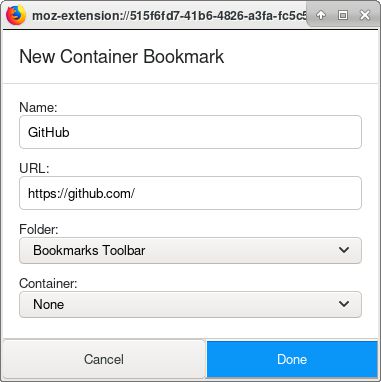
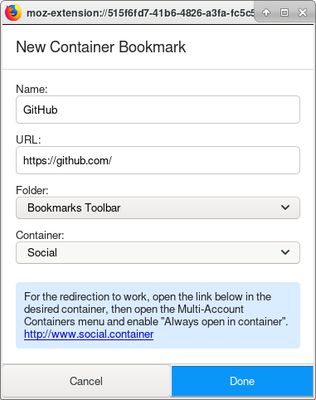
When you create a new bookmark, the extension will open a popup where you can change the bookmark details just like you would through the native Firefox popup. But in addition to that, you can also choose which container you want the bookmark to open in.
When you choose a container, you have to do what it says. For example: open http://www.social.container/ in a social container, then open the Multi-Account Containers menu and enable the option "Always open in container".
Now, every time you go to http://www.social.container/, it will open in a social container. The extension uses this functionality to perform the redirect:
The extension also adds a "Edit Container Bookmark" context menu to your bookmarks, so that you can edit them and move them to a different container if you wish.
If you want to use another redirect key instead of "container", you can change it in the preferences page of the extension.
Permissions
The extension uses the following permissions:
<all_urls> - Used along with `webRequest` and `webRequestBlocking`.
bookmarks - Used to detect when a new bookmark was created, to remove and update bookmarks, and to retrieve the names of your bookmark folders.
contextualIdentities - Used to retrieve the names of your containers.
menus - Used to create a context menu for bookmarks.
storage - Used to save your preferences.
webRequest - Used to monitor your requests to search for container fragments.
webRequestBlocking - Used to intercept and redirect requests with container fragments.
It is not currently possible to configure bookmarks to open in containers at a bookmark-level, so this extension uses the workaround that was posted by GodKratos here, but makes that process much easier and faster.
How to use it?
When you create a new bookmark, the extension will open a popup where you can change the bookmark details just like you would through the native Firefox popup. But in addition to that, you can also choose which container you want the bookmark to open in.
When you choose a container, you have to do what it says. For example: open http://www.social.container/ in a social container, then open the Multi-Account Containers menu and enable the option "Always open in container".
Now, every time you go to http://www.social.container/, it will open in a social container. The extension uses this functionality to perform the redirect:
- When you save the bookmark, it will be saved with a fragment appended at the end of the URL to indicate that it is a container bookmark. For example: https://github.com/#container-social
- When you open the bookmark, you will navigate to https://github.com/#container-social.
- The extension will see that the URL has a `#container-%name%` fragment and will redirect you to `http://www.%name%.container/%original-url`. For example: http://www.social.container/https://github.com/
- Since http://www.social.container/ is configured to always open in a social container, this means that you will now be in the desired container.
- Finally, the extension will redirect you to the original URL, so that you arrive at https://github.com/ in a social container.
The extension also adds a "Edit Container Bookmark" context menu to your bookmarks, so that you can edit them and move them to a different container if you wish.
If you want to use another redirect key instead of "container", you can change it in the preferences page of the extension.
Permissions
The extension uses the following permissions:
<all_urls> - Used along with `webRequest` and `webRequestBlocking`.
bookmarks - Used to detect when a new bookmark was created, to remove and update bookmarks, and to retrieve the names of your bookmark folders.
contextualIdentities - Used to retrieve the names of your containers.
menus - Used to create a context menu for bookmarks.
storage - Used to save your preferences.
webRequest - Used to monitor your requests to search for container fragments.
webRequestBlocking - Used to intercept and redirect requests with container fragments.
评分 4.4(1 位用户)
权限与数据
更多信息