Tiện ích trình duyệt Firefox
  • Tiện ích mở rộng
  • Chủ đề
    • cho Firefox
    • Từ điển & gói ngôn ngữ
    • Các trang web trình duyệt khác
    • Tiện ích cho Android
Đăng nhập
Xem trước Tab Save & Restore

Tab Save & Restore bởi Adit Bhatt

Saves the links of all open tabs and allows for one by one or all together restoration.

3.6 (21 đánh giá)3.6 (21 đánh giá)
507 người dùng507 người dùng
Tải xuống Firefox và tải tiện ích mở rộng
Tải xuống tập tin

Siêu dữ liệu mở rộng

Ảnh chụp màn hình
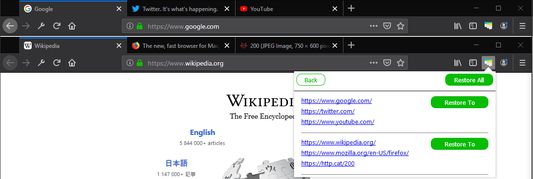
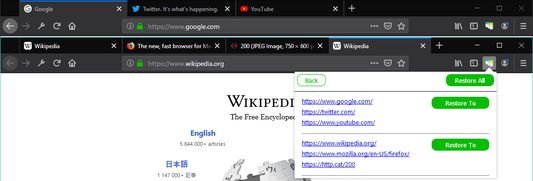
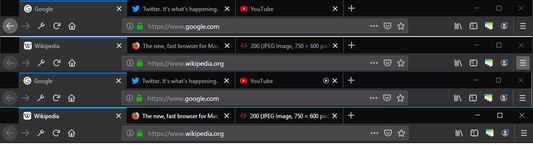
Extension iconClicking the extension results in two options `Save` and `Restore`.`Save` will save the urls of open tabs from every window (replacing any previously saved tabs).`Restore` will show a list of the saved urls, organized by window. This list remains even after the browser has been closed and reopened.Clicking an individual link will open that link in a new tab of the active window.Clicking `Restore To` provides two options to restore the entire window`Current Window` will restore the tabs to the active window`New Window` will restore the tabs to a new windowClicking `Restore All` will restore every group of tabs into a new window
Về tiện ích mở rộng này
This extension allows you to save the open tabs from your window and then restore them at a later time. You can restore them individually or all at once.

The motivation behind this extension is to allow for easy tab management without the hassle of being signed in to your browser. Oftentimes, I've wanted to save my open tabs before shutting down my computer, but I prefer not to attach an account to my browser. Before, I would waste time copying and pasting each tab's url to a text file so I could remember what I was doing. Now, by using this extension, it is simply a matter of clicking a few buttons to re-open all of your tabs.

For usage help, see the README on Github. Please submit any issues on Github as well.
Được xếp hạng 3,6 (bởi 1 người dùng)
Đăng nhập để đánh giá tiện ích này
Chưa có xếp hạng nào

Đã lưu xếp hạng sao

5
11
4
1
3
4
2
0
1
5
Đọc tất cả 21 đánh giá
Quyền hạn và dữ liệu

Quyền hạn bắt buộc:

  • Truy cập các thẻ trên trình duyệt
Tìm hiểu thêm
Thêm thông tin
Liên kết tiện ích
  • Trang hỗ trợ
  • Email hỗ trợ
Phiên bản
3.0
Kích cỡ
47,16 KB
Cập nhật gần nhất
7 năm trước (5 Thg 05 2019)
Thể loại có liên quan
  • Diện mạo
  • Đánh dấu
  • Thẻ
Giấy phép
Mozilla Public License 2.0
Lịch sử các phiên bản
  • Xem tất cả phiên bản
Thêm vào bộ sưu tập
Báo cáo tiện ích này
Đi đến trang chủ Mozilla

Tiện ích

  • Giới thiệu
  • Blog tiện ích Firefox
  • Extension Workshop
  • Trung tâm nhà phát triển
  • Chính sách nhà phát triển
  • Blog cộng đồng
  • Diễn đàn
  • Báo cáo một lỗi
  • Hướng dẫn đánh giá

Trình duyệt

  • Desktop
  • Mobile
  • Enterprise

Sản phẩm

  • Browsers
  • VPN
  • Relay
  • Monitor
  • Pocket
  • Bluesky (@firefox.com)
  • Instagram (Firefox)
  • YouTube (firefoxchannel)
  • Riêng tư
  • Cookie
  • Pháp lý

Trừ trường hợp khác đã ghi chú, nội dung trên trang này được cấp phép theo giấy phép Creative Commons Attribution Share-Alike v3.0 hoặc bất kỳ phiên bản nào sau này.