Screen Recorder bởi Bernard
Record your computer's screen with just one click!
18.476 người dùng18.476 người dùng
Siêu dữ liệu mở rộng
Ảnh chụp màn hình
Về tiện ích mở rộng này
Screen Recorder addon helps you record video from the computer's screen.
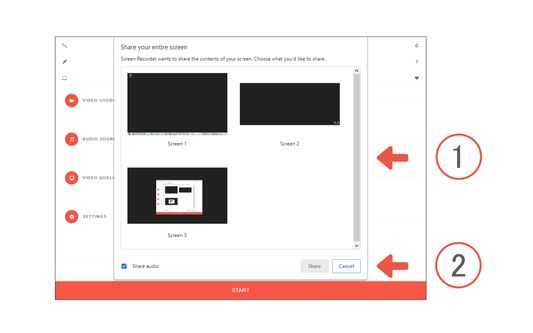
To work with this addon, please click on the toolbar button. Once the recorder interface appears, please adjust desired options, and then click the - Start - button. The video source could be your screen, window, or tab. The audio source can be the system's audio, microphone, mixed, or no audio at all. When you click the start button, a popup will appear within the interface. This popup window allows you to select the desired screen, tab, or window. To start recording please click on the - Share - button. When you are done recording the screen, please press the toolbar button (or the stop button on the app interface) to stop the recording process. The recorded video will be download to your computer automatically (on the default download location).
By default, recorded media is in - webm - format. To get more information about webm video format, please visit this Wikipedia page (https://en.wikipedia.org/wiki/WebM). If you want to change this format to a different one, please use a different software.
Note: currently in Firefox, recording the audio is not supported. "navigator.mediaDevices.getDisplayMedia" API, does not have audio capabilities. In the future, if this capability is added to the API, it will be included in the addon automatically.
To report bugs, please fill the bug report form on the addon's homepage.
To work with this addon, please click on the toolbar button. Once the recorder interface appears, please adjust desired options, and then click the - Start - button. The video source could be your screen, window, or tab. The audio source can be the system's audio, microphone, mixed, or no audio at all. When you click the start button, a popup will appear within the interface. This popup window allows you to select the desired screen, tab, or window. To start recording please click on the - Share - button. When you are done recording the screen, please press the toolbar button (or the stop button on the app interface) to stop the recording process. The recorded video will be download to your computer automatically (on the default download location).
By default, recorded media is in - webm - format. To get more information about webm video format, please visit this Wikipedia page (https://en.wikipedia.org/wiki/WebM). If you want to change this format to a different one, please use a different software.
Note: currently in Firefox, recording the audio is not supported. "navigator.mediaDevices.getDisplayMedia" API, does not have audio capabilities. In the future, if this capability is added to the API, it will be included in the addon automatically.
To report bugs, please fill the bug report form on the addon's homepage.
Được xếp hạng 2,6 (bởi 1 người dùng)
Quyền hạn và dữ liệu
Thêm thông tin
- Liên kết tiện ích
- Phiên bản
- 0.2.2
- Kích cỡ
- 65,41 KB
- Cập nhật gần nhất
- 4 tháng trước (12 Thg 08 2025)
- Thể loại có liên quan
- Giấy phép
- Mozilla Public License 2.0
- Lịch sử các phiên bản
- Thêm vào bộ sưu tập
Nhà phát triển của tiện ích mở rộng này yêu cầu bạn giúp hỗ trợ sự phát triển liên tục của nó bằng cách đóng góp nhỏ.