
Wappify bởi Kris Kuiper
Allows any website to be installed and launched as a true standalone full-screen app, instead of just a browser shortcut.
7 người dùng7 người dùng
Siêu dữ liệu mở rộng
Ảnh chụp màn hình




Về tiện ích mở rộng này
Firefox includes a built-in "Add app to Home Screen" option.
However, this feature isn’t always available and will only show the option "Add To Home Screen", because many websites aren’t properly configured to support it.
In those cases, the site can only be added as a regular shortcut and when opened, it appears in a normal brower tab — with the address bar visible, just like any other website.
Wappify makes it possible to install those websites as real apps.
It automatically provides the browser with the details it needs — such as the site’s name, colors, and icon — so you can launch it in full screen, without the address bar, as a true standalone app.
Plus, all your favorite browser extensions remain active while using it.
Tutorial:
1. Install the Wappify browser extension.
2. Visit any website you’d like to turn into an app.
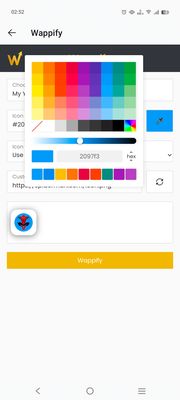
3. Open the Wappify extension, customize the app title and icon, then click on "Wappify".
4. The page will automatically reload.
5. Tap the ⋮ menu icon in your browser.
6. Select "Add app to Home screen" or "Install app".
An icon will appear on your home screen. Tap it anytime to open this site directly.
Now enjoy the website as a full screen app with all favorite other browser extensions active.
However, this feature isn’t always available and will only show the option "Add To Home Screen", because many websites aren’t properly configured to support it.
In those cases, the site can only be added as a regular shortcut and when opened, it appears in a normal brower tab — with the address bar visible, just like any other website.
Wappify makes it possible to install those websites as real apps.
It automatically provides the browser with the details it needs — such as the site’s name, colors, and icon — so you can launch it in full screen, without the address bar, as a true standalone app.
Plus, all your favorite browser extensions remain active while using it.
Tutorial:
1. Install the Wappify browser extension.
2. Visit any website you’d like to turn into an app.
3. Open the Wappify extension, customize the app title and icon, then click on "Wappify".
4. The page will automatically reload.
5. Tap the ⋮ menu icon in your browser.
6. Select "Add app to Home screen" or "Install app".
An icon will appear on your home screen. Tap it anytime to open this site directly.
Now enjoy the website as a full screen app with all favorite other browser extensions active.
Được xếp hạng 0 (bởi 1 người dùng)
Quyền hạn và dữ liệu
Quyền hạn bắt buộc:
- Chặn nội dung trên bất kỳ trang nào
- Truy cập các thẻ trên trình duyệt
- Truy cập dữ liệu của bạn trên mọi trang web
Quyền hạn tùy chọn:
- Truy cập dữ liệu của bạn trên mọi trang web
Thu thập dữ liệu:
- Nhà phát triển cho biết tiện ích mở rộng này không yêu cầu thu thập dữ liệu.
Thêm thông tin
- Phiên bản
- 1.2.2
- Kích cỡ
- 231,2 KB
- Cập nhật gần nhất
- một tháng trước (4 Thg 11 2025)
- Thể loại có liên quan
- Giấy phép
- Mọi Quyền Được Bảo Lưu
- Lịch sử các phiên bản
- Thêm vào bộ sưu tập