Page Saver WE screenshot capture tool автор Kathleen Brade, Mark Smith
Quickly and easily capture an image of a web page. Options allow you to control output format (PNG or JPEG), file name and more.
7 328 Users7 328 Users
Метадані розширення
Знімки екрана
Про це розширення
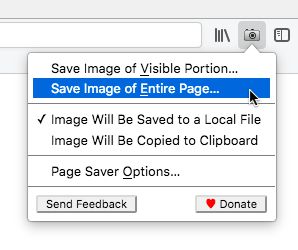
Page Saver WE lets you capture images of web pages and save them to a file in PNG or JPEG format, or to the system clipboard. Using Page Saver, you can capture a web page screenshot of an entire page or just the visible portion. To allow you to control the image capture process, a variety of options are provided including a file name pattern and support for an optional header and footer.
To begin using Page Saver WE, click the camera icon on your Firefox toolbar or press Alt+Shift+I (Linux and Windows) or ⌘+Shift+I (macOS).
Please Note: Due to restrictions Firefox imposes on extensions, Page Saver WE cannot capture images of internal Firefox pages such as about:addons or Mozilla hosted pages such as https://03.yfhome.xyz/.
Questions? Contact the developers by sending email to support@pearlcrescent.com
To begin using Page Saver WE, click the camera icon on your Firefox toolbar or press Alt+Shift+I (Linux and Windows) or ⌘+Shift+I (macOS).
Please Note: Due to restrictions Firefox imposes on extensions, Page Saver WE cannot capture images of internal Firefox pages such as about:addons or Mozilla hosted pages such as https://03.yfhome.xyz/.
Questions? Contact the developers by sending email to support@pearlcrescent.com
Rated 4,4 by 88 reviewers
Permissions and data
Необхідні дозволи:
- Збереження даних в буфер обміну
- Завантажувати файли, а також читати й змінювати історію браузера
- Отримувати доступ до ваших даних для всіх вебсайтів
Більше інформації
- Посилання додатка
- Версія
- 0.8.2
- Розмір
- 103,28 КБ
- Востаннє оновлено
- 3 роки тому (27 лип 2022 р.)
- Пов'язані категорії
- Ліцензія
- Page Saver License
- Історія версій
- Додати до збірки
Розробники цього розширення просять вас посприяти його подальшому розвитку, зробивши невеликий внесок.