CleansingX: Twitter X Filter автор A Muh Mufqi Zuhudi
Filter and hide unwanted content on X.com (formerly Twitter) to enhance your browsing experience.
15 Users15 Users
Метадані розширення
Знімки екрана

Про це розширення
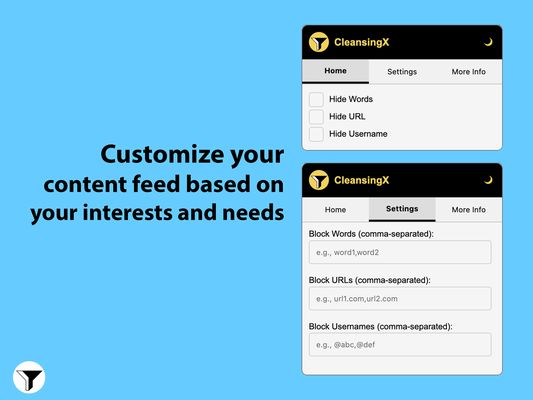
CleansingX is an extension that helps filter and hide unwanted content on X.com (formerly Twitter) to enhance your browsing experience.
Key Features
- Word Filtering: Hide posts containing specific words or phrases.
- URL Filtering: Block content from specific domains or URLs.
- Username Filtering: Hide posts from specific usernames.
- Wildcard Support: Use * for flexible pattern matching.
- Dark/Light Theme: Toggle between dark and light interface modes.
- Real-time Filtering: Updates content filtering as you scroll.
- Persistent Settings: Your filters and preferences are saved across sessions.
How to Use
- Click the CleansingX icon in your browser toolbar
- Navigate between:
a) Home: Quick enable/disable filters
b) Settings: Configure filter rules
c) Info: View extension information and support
Adding Filters
- Words: Enter comma-separated words or phrases to block
- URLs: Enter comma-separated domain names (e.g., example.com*)
- Usernames: Enter comma-separated usernames with @ prefix
Wildcard Pattern Examples
-
-
-
Support
For bugs, feature requests, or questions:
- Open an issue on GitHub
- Contact: mail@moefqy.com
Key Features
- Word Filtering: Hide posts containing specific words or phrases.
- URL Filtering: Block content from specific domains or URLs.
- Username Filtering: Hide posts from specific usernames.
- Wildcard Support: Use * for flexible pattern matching.
- Dark/Light Theme: Toggle between dark and light interface modes.
- Real-time Filtering: Updates content filtering as you scroll.
- Persistent Settings: Your filters and preferences are saved across sessions.
How to Use
- Click the CleansingX icon in your browser toolbar
- Navigate between:
a) Home: Quick enable/disable filters
b) Settings: Configure filter rules
c) Info: View extension information and support
Adding Filters
- Words: Enter comma-separated words or phrases to block
- URLs: Enter comma-separated domain names (e.g., example.com*)
- Usernames: Enter comma-separated usernames with @ prefix
Wildcard Pattern Examples
-
word* - Matches anything starting with "word"-
*word - Matches anything ending with "word"-
*word* - Matches anything containing "word"Support
For bugs, feature requests, or questions:
- Open an issue on GitHub
- Contact: mail@moefqy.com
Rated 5 by 1 reviewer
Permissions and data
Необхідні дозволи:
- Отримувати доступ до вкладок браузера
- Отримувати доступ до ваших даних для вебсайтів у домені twitter.com
- Отримувати доступ до ваших даних для вебсайтів у домені x.com
Більше інформації
- Посилання додатка
- Версія
- 1.0.1
- Розмір
- 26,52 КБ
- Востаннє оновлено
- рік тому (4 січ 2025 р.)
- Пов'язані категорії
- Ліцензія
- Ліцензія MIT
- Історія версій
- Додати до збірки
Розробник цього розширення просить вас посприяти його подальшому розвитку, зробивши невеликий внесок.