
Tab Center Reborn geliştiren: ariasuni
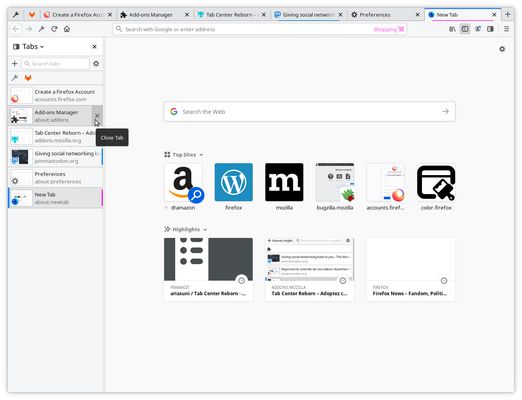
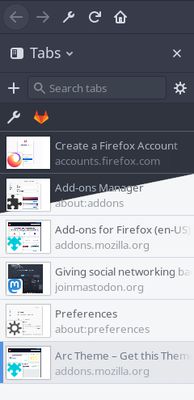
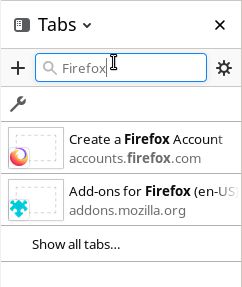
Firefox eklentisinin ilk sürümü, sekmeleri moda olduğu şekliyle yatay değil dikey olarak düzenler. Bu, muhteşem VerticalTabs eklentisinden ödünç alınmış bir fikir ve ondan yoğun bir şekilde ilham alır.
2.015 kullanıcı2.015 kullanıcı
Uzantı meta verileri
Ekran görüntüleri
Bu uzantı hakkında
Tab Center Reborn is the continuation of <a href="https://03.yfhome.xyz/firefox/addon/tab-center-redux/">Tab Center Redux</a> to provide a simple, powerful and well-integrated extension to manage tabs vertically.
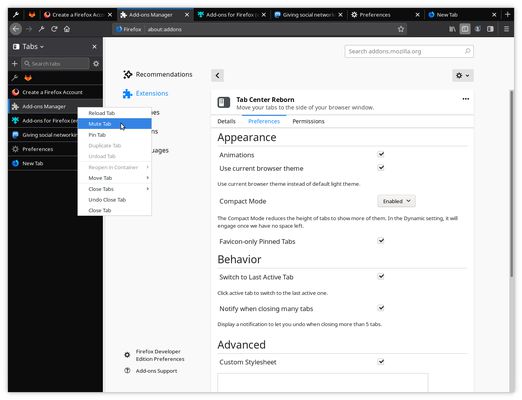
The extension provides a handful of settings and allows power-users to customize its appearance completely with CSS code.
https://framagit.org/ariasuni/tabcenter-reborn/wikis/home
You might especially be interested in hiding the top tab bar:
https://framagit.org/ariasuni/tabcenter-reborn/wikis/home#userchromecss-tweaks
Features:
– All features of Firefox tab bar (pinning, duplicating, moving to start/end, closing tabs after, etc.)
– “Unload Tab” and “Close Tabs Before” options to accommodate managing a lot of tabs
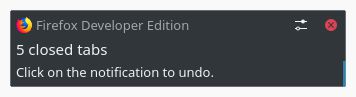
– A notification allows you to undo if “Close Tabs Before”, “Close Tabs After” or “Close Other Tabs” closed more than 5 tabs
– Looks and act native, has animations (can be disabled)
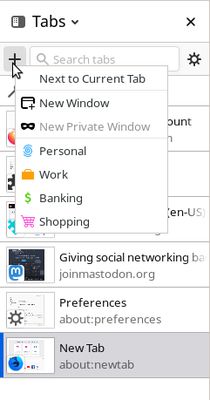
– Works with and uses containers: https://support.mozilla.org/en-US/kb/containers
– Adapt to full Firefox themes (simpler themes don’t provide enough colors to work with)
– Synchronizes your settings with Firefox Sync
Global shortcuts:
– Shift + F1: opens or closes the sidebar
– Shift + F2: switches to last active tab
Note that you can configure those: https://support.mozilla.org/en-US/kb/manage-extension-shortcuts-firefox
Shortcuts when clicking new tab button/container name in new tab context menu (right-click):
– Ctrl + click: opens after current tab if default is at the end (and opens at the end if default is after current tab)
– Shift + click: opens a new window
– Ctrl + Shift + click: opens a new private window (if Tab Center Reborn is allowed to run in private windows)
You can contribute by reporting issues, translating, adding documentation or developing!
https://framagit.org/ariasuni/tabcenter-reborn/blob/main/CONTRIBUTING.md
Permissions used:
– Access your data for all websites: to use containers.
– Read and modify bookmarks: to not open a new window when a tab has been dropped outside the sidebar but on the bookmark bar.
– Read and modify browser settings: to follow Firefox settings and theme.
– Display notifications to you: to display a notification when you closed a lot of tabs, letting you undo.
– Access recently closed tabs: to switch to last tab.
– Access browser tabs: to get URL, title and favicons of tabs.
– Access browser activity during navigation: to trigger an extra animation when a page has finished loading its resources.
The extension provides a handful of settings and allows power-users to customize its appearance completely with CSS code.
https://framagit.org/ariasuni/tabcenter-reborn/wikis/home
You might especially be interested in hiding the top tab bar:
https://framagit.org/ariasuni/tabcenter-reborn/wikis/home#userchromecss-tweaks
Features:
– All features of Firefox tab bar (pinning, duplicating, moving to start/end, closing tabs after, etc.)
– “Unload Tab” and “Close Tabs Before” options to accommodate managing a lot of tabs
– A notification allows you to undo if “Close Tabs Before”, “Close Tabs After” or “Close Other Tabs” closed more than 5 tabs
– Looks and act native, has animations (can be disabled)
– Works with and uses containers: https://support.mozilla.org/en-US/kb/containers
– Adapt to full Firefox themes (simpler themes don’t provide enough colors to work with)
– Synchronizes your settings with Firefox Sync
Global shortcuts:
– Shift + F1: opens or closes the sidebar
– Shift + F2: switches to last active tab
Note that you can configure those: https://support.mozilla.org/en-US/kb/manage-extension-shortcuts-firefox
Shortcuts when clicking new tab button/container name in new tab context menu (right-click):
– Ctrl + click: opens after current tab if default is at the end (and opens at the end if default is after current tab)
– Shift + click: opens a new window
– Ctrl + Shift + click: opens a new private window (if Tab Center Reborn is allowed to run in private windows)
You can contribute by reporting issues, translating, adding documentation or developing!
https://framagit.org/ariasuni/tabcenter-reborn/blob/main/CONTRIBUTING.md
Permissions used:
– Access your data for all websites: to use containers.
– Read and modify bookmarks: to not open a new window when a tab has been dropped outside the sidebar but on the bookmark bar.
– Read and modify browser settings: to follow Firefox settings and theme.
– Display notifications to you: to display a notification when you closed a lot of tabs, letting you undo.
– Access recently closed tabs: to switch to last tab.
– Access browser tabs: to get URL, title and favicons of tabs.
– Access browser activity during navigation: to trigger an extra animation when a page has finished loading its resources.
140 inceleyiciden 4,8 puan aldı
İzinler ve veriler
Gerekli izinler:
- Yer imlerini okuma ve değiştirme
- Tarayıcı ayarlarını okuma ve değiştirme
- Son kapatılan sekmelere erişme
- Tarayıcı sekmelerine erişme
- Gezinti sırasında tarayıcı etkinliğine erişme
- Tüm web sitelerine ait verilerinize erişme
Daha fazla bilgi
- Eklenti bağlantıları
- Sürüm
- 3.0.2
- Boyut
- 77,1 KB
- Son güncelleme
- 7 gün önce (30 Kas 2025)
- İlgili kategoriler
- Lisans
- Mozilla Kamu Lisansı 2.0
- Sürüm geçmişi
- Koleksiyona ekle
Bu uzantının geliştiricisi, küçük bir bağışta bulunarak gelişimin devamı için katkıda bulunmanızı rica ediyor.