
Batch Image Downloader av william
List all the images on the page and download them all with one click, filter by size.
7 användare7 användare
Metadata för tillägg
Skärmbilder
Om detta tillägg
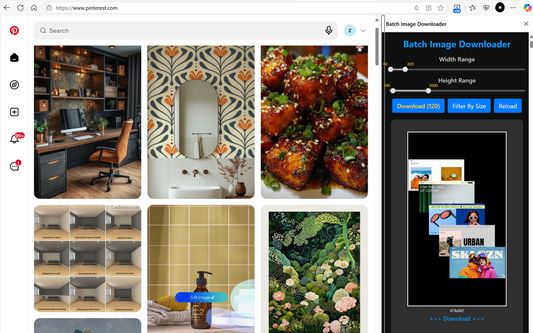
If you are used to downloading high-definition photos from Pinterest, Pixabay, Pexels, Burst and other image sites, then you definitely need this Batch Image Downloader.
List all the images on the page and download them all with one click, it's free and efficient.
Supports PNG, JPEG, SVG, WEBP and other image formats, small image preview, one-click download.
You can filter images of specified size before downloading.
Features:
☆ Batch download all Images on the web page
☆ Filter by image size
☆ Support dynamically loaded images
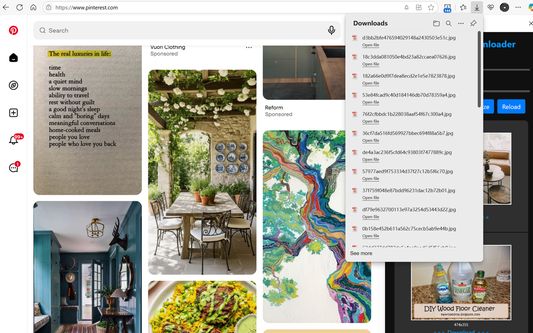
☆ One-click download
☆ Persistent display in the sidebar
How to use the extension:
1. Open the web page, the number of images will be displayed on the extension icon.
2. Click the "download" button to download all images.
3. Filter by specified range of width and height and download all.
4. Or download a single image.
Note: Images encoded in BASE-64 cannot be downloaded (i.e., images starting with data:image).
If you can not find any image in top tabs, Please press Ctrl+F5 to force refresh it and reload sidebar.
List all the images on the page and download them all with one click, it's free and efficient.
Supports PNG, JPEG, SVG, WEBP and other image formats, small image preview, one-click download.
You can filter images of specified size before downloading.
Features:
☆ Batch download all Images on the web page
☆ Filter by image size
☆ Support dynamically loaded images
☆ One-click download
☆ Persistent display in the sidebar
How to use the extension:
1. Open the web page, the number of images will be displayed on the extension icon.
2. Click the "download" button to download all images.
3. Filter by specified range of width and height and download all.
4. Or download a single image.
Note: Images encoded in BASE-64 cannot be downloaded (i.e., images starting with data:image).
If you can not find any image in top tabs, Please press Ctrl+F5 to force refresh it and reload sidebar.
Betyg 0 av 0 recensenter
Behörigheter och data
Nödvändiga behörigheter:
- Blockera innehåll på vilken sida som helst
- Ladda ner filer och läsa och ändra webbläsarens nedladdningshistorik
- Åtkomst till webbläsarens flikar
- Åtkomst till dina data för alla webbplatser
Valfria behörigheter:
- Åtkomst till dina data för alla webbplatser
Mer information
- Version
- 1.10
- Storlek
- 172,25 kB
- Senast uppdaterad
- för 2 månader sedan (13 okt 2025)
- Relaterade kategorier
- Versionshistorik
- Lägg till i samling