
WebP / Avif image converter de Nullbrains
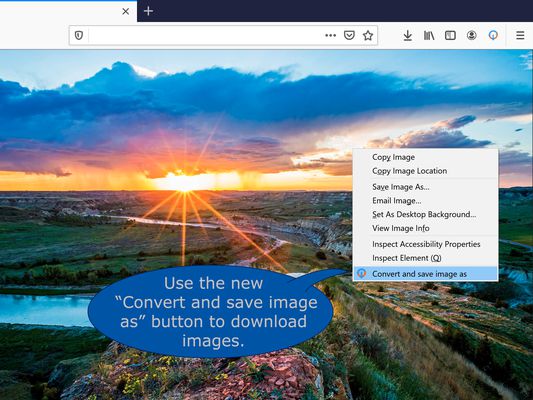
Convert WebP, Avif and other image types before saving and store them in an orderly fashion. All based on your preferences and fully automatic. Simply right click on an image and use the "Convert and save as" button. More details in the description.
18.953 de utilizatori18.953 de utilizatori
Metadate extensie
Capturi de ecran
Despre această extensie
WebP / Avifimage Converter: convert, download and store images from the web just the way you want.
How does it work?
After downloading the addon you get a new button Convert and Save image as in the image context menu (When you right click on an image). Now the image is being processed and downloaded based on your preferences. Conversion to JPG and PNG are supported.
These preferences can be set in the option menu that you can reach by clicking on the addons’ browser button located on the top right of your browser next to the address bar.
What can you configure?
Image conversion types
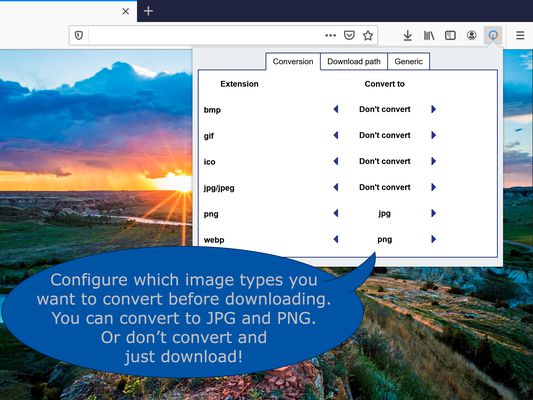
For each image type you can select if and to what image type it is supposed to be converted or not.
Download location
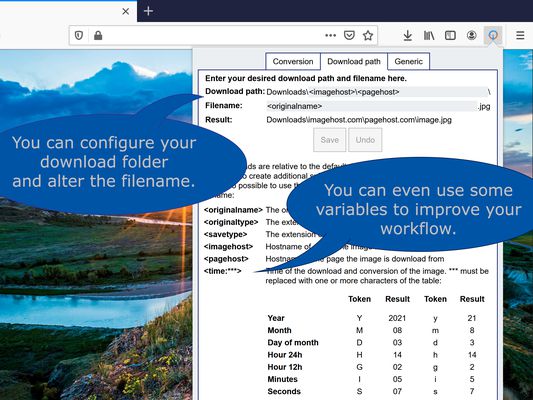
To keep downloads sorted you can specify your preferred download location and filename. The Download location and filenames can include information of the time and date of downloading, image origin and image format. The exact details can be found in the addon.
Note that download locations are always relative to your download folder.
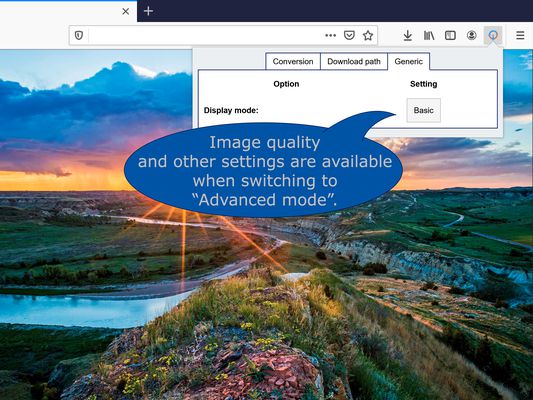
Actions (Advanced section)
The action performed by the addon can be changed, and by using optional modifier keys multiple actions can easily be available. This can be useful when you occasionally want to download images without converting them yet but still want to store them on the specified location. Or if you want to download only PNG files for example.
Popup layout (Advanced section)
For quick access specify which tab you want to open by default.
Generic (Advanced section)
To optimize your workflow you can turn off the popup that suggests download location and filename.
To stop cluttering your download history all downloads can be done in incognito mode thereby all downloads are forgotten. This however requires that you allow the addon to run in "private windows".
Faq
Permission justification
How does it work?
After downloading the addon you get a new button Convert and Save image as in the image context menu (When you right click on an image). Now the image is being processed and downloaded based on your preferences. Conversion to JPG and PNG are supported.
These preferences can be set in the option menu that you can reach by clicking on the addons’ browser button located on the top right of your browser next to the address bar.
What can you configure?
Image conversion types
For each image type you can select if and to what image type it is supposed to be converted or not.
Download location
To keep downloads sorted you can specify your preferred download location and filename. The Download location and filenames can include information of the time and date of downloading, image origin and image format. The exact details can be found in the addon.
Note that download locations are always relative to your download folder.
Actions (Advanced section)
The action performed by the addon can be changed, and by using optional modifier keys multiple actions can easily be available. This can be useful when you occasionally want to download images without converting them yet but still want to store them on the specified location. Or if you want to download only PNG files for example.
Popup layout (Advanced section)
For quick access specify which tab you want to open by default.
Generic (Advanced section)
To optimize your workflow you can turn off the popup that suggests download location and filename.
To stop cluttering your download history all downloads can be done in incognito mode thereby all downloads are forgotten. This however requires that you allow the addon to run in "private windows".
Faq
- The image that was downloaded and converted did not converted to the intended filetype.
Webp /Avif image converter uses the actual file data to determine the file type not the url.
Therefor, you may experience that a conversion may be different than what you may expect if you look at the url.
Also file extensions are corrected to the appropriate extension in these cases if you turned off conversion for the specific file type. - The quality settings for Webp conversion cannot be lowered.
For conversion to Webp, Webp /Avif image converter uses the firefox engine to do the heavy lifting. Although Webp conversion is supported from Firefox version 96, quality settings can only be adjusted from Firefox 98 onward. Version 96 and 97 show the slider maxed out since that matches the default settings when you upgrade to Firefox 98 or higher.
Permission justification
- storage: Allows the addon to save your settings.
- downloads: Allows the addon to initiate a file download for the converted image.
- contextMenus: Allows the addon to add the "convert and save" button to the image contextmenu
- <all_urls>: Allows the addon to download the image before converting the it.
Evaluat cu 3,9 de către 127 de recenzori
Permisiuni și date
Permisiuni necesare:
- Să descarce fișiere și să citească sau să modifice istoricul descărcărilor din browser
- Să îți acceseze datele pentru toate site-urile web
Mai multe informații
- Linkurile suplimentului
- Versiune
- 1.3.1
- Mărime
- 47,75 KB
- Ultima actualizare
- un an în urmă (14 iun. 2024)
- Categorii conexe
- Licență
- Mozilla Public License 2.0
- Istoricul versiunilor
- Adaugă în colecție