
Secure access to Discord with privacy de Winfy
Secure anonymous access for Discord free communications app that lets you chat with friends and game communities.
5 utilizatori5 utilizatori
Metadate extensie
Capturi de ecran


Despre această extensie
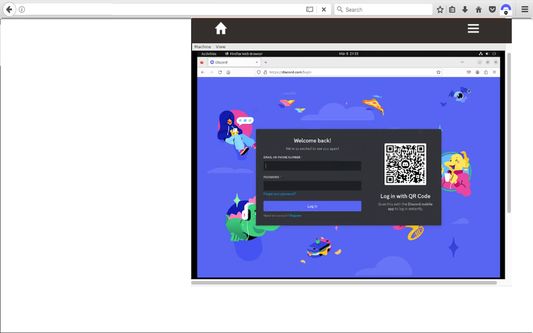
Cordfy is an extension that provides a secure and anonymous access to Discord. Our application aims to offer users a safe and private way to connect with others on the popular communication platform. Below, you will find a comprehensive overview of our features and the benefits they bring to our users. Users can connect to the platform without revealing any personal information from their PC, ensuring their privacy and security online. Cordfy offers a seamless user experience while protecting their data and identity.
Key Features:
1. Secure and Anonymous Access: Cordfy allows users to create an account without providing any personal information. Their identity remains protected while using the application.
2. End-to-End Encryption: All messages and calls on Cordfy are encrypted to prevent unauthorized access to user conversations.
3. Anti-Tracking: Cordfy blocks tracking technologies to maintain user privacy and prevent third-party data collection.
4. IP Masking: Users’ IP addresses are masked to ensure anonymity while using the application.
5. Access to Discord Features: Users can enjoy all the features that Discord provides, including voice and video calls, text messaging, and community forums.
Overall, our application aims to provide users with a secure and anonymous way to access Discord, enabling them to connect with others without compromising their privacy. We are committed to delivering a safe and reliable platform for communication and community building.
Remember that Discord is a free communications app that lets you share voice, video, and text chat with friends, game communities, and developers. It has hundreds of millions of users, making it one of the most popular ways to connect with people online. Anyone can create a Discord server for free for any number of reasons. You can use it to gather friends together in a group text just generally. Use it to post gifs, share memes and screenshots, or talk about your day. You can stream your game to your friends and publishers often use Discord as a place to share gaming goodies with their communities. You can see concept art, new screenshots, and even be given access to a game on Discord.
A new Discord server will start with a General channel, but admins can create multiple channels for specific reasons. These could include server Announcements and Rules, or specific game-related chats, such as a Fortnite channel. It’s up to the admin and the server users to define. Game Streaming in Discord
You can stream your screen to your Discord pals and community. This isn’t like Twitch, YouTube, or Facebook, where it’s meant to be a public show. It’s more of an advanced version of video chat. You can do it in direct message via the home screen or within a public voice chat on the server. It’s entirely confined to the server and to the channel to which you started to stream. You can use it to share your progress in a game with friends, or to show off some loot, or to ask for assistance. You’re even capable of streaming other screens, such as a paint program. Though you can stream a screen alongside your video stream, you can’t combine the screens to overlay you playing picture-in-picture. Unless you buy Nitro, streaming is limited to 720p and up to 30fps. Nitro users can stream up to their source resolution at up to 60fps.
This extension is like a VPN access but providing workstations at the same time so no change to Discord is performed.
Key Features:
1. Secure and Anonymous Access: Cordfy allows users to create an account without providing any personal information. Their identity remains protected while using the application.
2. End-to-End Encryption: All messages and calls on Cordfy are encrypted to prevent unauthorized access to user conversations.
3. Anti-Tracking: Cordfy blocks tracking technologies to maintain user privacy and prevent third-party data collection.
4. IP Masking: Users’ IP addresses are masked to ensure anonymity while using the application.
5. Access to Discord Features: Users can enjoy all the features that Discord provides, including voice and video calls, text messaging, and community forums.
Overall, our application aims to provide users with a secure and anonymous way to access Discord, enabling them to connect with others without compromising their privacy. We are committed to delivering a safe and reliable platform for communication and community building.
Remember that Discord is a free communications app that lets you share voice, video, and text chat with friends, game communities, and developers. It has hundreds of millions of users, making it one of the most popular ways to connect with people online. Anyone can create a Discord server for free for any number of reasons. You can use it to gather friends together in a group text just generally. Use it to post gifs, share memes and screenshots, or talk about your day. You can stream your game to your friends and publishers often use Discord as a place to share gaming goodies with their communities. You can see concept art, new screenshots, and even be given access to a game on Discord.
A new Discord server will start with a General channel, but admins can create multiple channels for specific reasons. These could include server Announcements and Rules, or specific game-related chats, such as a Fortnite channel. It’s up to the admin and the server users to define. Game Streaming in Discord
You can stream your screen to your Discord pals and community. This isn’t like Twitch, YouTube, or Facebook, where it’s meant to be a public show. It’s more of an advanced version of video chat. You can do it in direct message via the home screen or within a public voice chat on the server. It’s entirely confined to the server and to the channel to which you started to stream. You can use it to share your progress in a game with friends, or to show off some loot, or to ask for assistance. You’re even capable of streaming other screens, such as a paint program. Though you can stream a screen alongside your video stream, you can’t combine the screens to overlay you playing picture-in-picture. Unless you buy Nitro, streaming is limited to 720p and up to 30fps. Nitro users can stream up to their source resolution at up to 60fps.
This extension is like a VPN access but providing workstations at the same time so no change to Discord is performed.
Evaluat cu 0 de către 0 recenzori
Permisiuni și date
Permisiuni necesare:
- Să acceseze activitatea browserului în timpul navigării
Permisiuni opționale:
- Să îți acceseze datele pentru toate site-urile web
Mai multe informații
- Linkurile suplimentului
- Versiune
- 1.1.4
- Mărime
- 663,16 KB
- Ultima actualizare
- 2 ani în urmă (15 mart. 2024)
- Categorii conexe
- Istoricul versiunilor
- Adaugă în colecție