
Reading Ruler de Oren Trutner
Highlights the line of text you are reading.
767 de utilizatori767 de utilizatori
Metadate extensie
Capturi de ecran

Despre această extensie
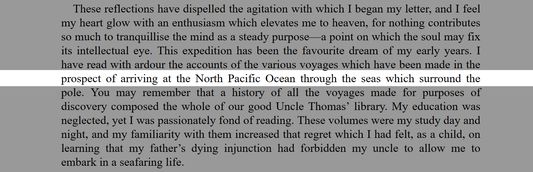
Reading Ruler highlights the row of text under the mouse cursor. This helps you focus on the text you are currently reading, or come back to it if your mind wanders as you read.
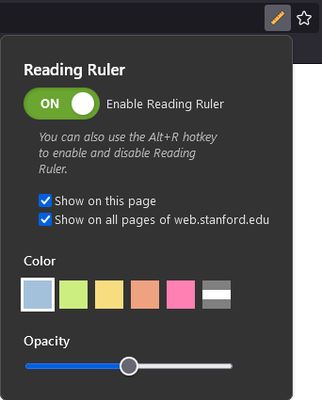
The ruler works best for articles, blogs and long posts. You can hide it on pages or sites where it doesn't help as much. To turn the ruler off for all sites, click the big Enable Reading Ruler button. You can also use the Alt+R hotkey to toggle the ruler without opening the options menu.
You can choose the color and opacity of the ruler for the level of contrast you like best.
Reading Ruler does not collect your data. It does not send anything to the cloud. It does not collect telemetry. It is not interested in monetization; and, it definitely does not show ads.
Reading Ruler is open source. And the source is short and sweet and that. You are welcome to take a look and convince yourself that the ruler does exactly what it says it does. Find us at https://github.com/orentrutner/reading-ruler.
The ruler works best for articles, blogs and long posts. You can hide it on pages or sites where it doesn't help as much. To turn the ruler off for all sites, click the big Enable Reading Ruler button. You can also use the Alt+R hotkey to toggle the ruler without opening the options menu.
You can choose the color and opacity of the ruler for the level of contrast you like best.
Reading Ruler does not collect your data. It does not send anything to the cloud. It does not collect telemetry. It is not interested in monetization; and, it definitely does not show ads.
Reading Ruler is open source. And the source is short and sweet and that. You are welcome to take a look and convince yourself that the ruler does exactly what it says it does. Find us at https://github.com/orentrutner/reading-ruler.
Evaluat cu 4,9 de către 27 de recenzori
Permisiuni și date
Permisiuni necesare:
- Să acceseze filele browserului
- Să îți acceseze datele pentru toate site-urile web
Mai multe informații
- Linkurile suplimentului
- Versiune
- 1.8
- Mărime
- 89,58 KB
- Ultima actualizare
- 3 ani în urmă (11 sept. 2022)
- Istoricul versiunilor
- Adaugă în colecție