
App for Spotify™ de Fernika
An easy-to-use and lite App for Spotify Music Player.
2.687 de utilizatori2.687 de utilizatori
Metadate extensie
Capturi de ecran


Despre această extensie
App for Spotify™ is the easiest way to play music in Spotify from your desktop machine (PC, MAC or Linux). Clicking on the toolbar button, renders Spotify Music Player in a standalone UI. Moreover, the window is re-sizable to your desired choice and all the changes are auto saved to the memory. Note, to start playing music, you need to create an account in Spotify website.
App for Spotify™ is designed to operate similar to Google Chrome Apps. In other words, it opens in a simple and stand-alone popup window (as opposed to the toolbar-popup or sidebar), and once closed, completely clears-off and won't have any further background activities. Having this behavior, it is considered a very lite Addon and does not add any additional burden to your Firefox browser. Moreover, the popup has a built-in "Always-On-Top" feature which makes the window remain always on top of other windows, and enables you to do multi-tasking.
Important Note: App for Spotify™ does NOT belong or related to the official Spotify website or application in any ways. It is an unofficial app that is developed and maintained independently. The official Spotify software is only released for smart phones and the web. This unofficial app (browser addon) is a wrapper to the original Spotify application and tries to make it usable as a browser plug-in.
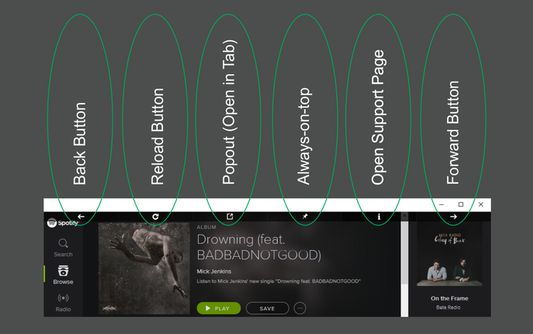
When you open the popup, you will see a toolbar with 6 buttons at the top. Toolbar buttons are described in the screenshot below (2nd picture). Note, after few seconds the toolbar will disappear by itself. But when you move the mouse to the top area, it will appear again.
Note: when you first run this addon, Spotify may ask you to install, upgrade, or activate Firefox's Flash plugin. This is because Spotify music player, is built based on Flash technology. After upgrading Flash plugin, music player should work without any issues.
Note: in order to report bugs, please fill the bug report form in the addon's Homepage.
App for Spotify™ is designed to operate similar to Google Chrome Apps. In other words, it opens in a simple and stand-alone popup window (as opposed to the toolbar-popup or sidebar), and once closed, completely clears-off and won't have any further background activities. Having this behavior, it is considered a very lite Addon and does not add any additional burden to your Firefox browser. Moreover, the popup has a built-in "Always-On-Top" feature which makes the window remain always on top of other windows, and enables you to do multi-tasking.
Important Note: App for Spotify™ does NOT belong or related to the official Spotify website or application in any ways. It is an unofficial app that is developed and maintained independently. The official Spotify software is only released for smart phones and the web. This unofficial app (browser addon) is a wrapper to the original Spotify application and tries to make it usable as a browser plug-in.
When you open the popup, you will see a toolbar with 6 buttons at the top. Toolbar buttons are described in the screenshot below (2nd picture). Note, after few seconds the toolbar will disappear by itself. But when you move the mouse to the top area, it will appear again.
Note: when you first run this addon, Spotify may ask you to install, upgrade, or activate Firefox's Flash plugin. This is because Spotify music player, is built based on Flash technology. After upgrading Flash plugin, music player should work without any issues.
Note: in order to report bugs, please fill the bug report form in the addon's Homepage.
Evaluat cu 4,2 de către 46 de recenzori
Permisiuni și date
Permisiuni necesare:
- Să îți acceseze datele pentru site-uri din domeniul spotify.com
- Să îți acceseze datele pentru site-uri din domeniul open.spotify.com
Mai multe informații
- Linkurile suplimentului
- Versiune
- 0.1.3resigned1
- Mărime
- 58,76 KB
- Ultima actualizare
- 2 ani în urmă (25 apr. 2024)
- Categorii conexe
- Licență
- Mozilla Public License 2.0
- Istoricul versiunilor
- Adaugă în colecție