
Lizard por arielg
Select and remove annoying or unnecessary elements from a page. Great for printing and readability.
186 usuários186 usuários
Metadados da extensão
Capturas de tela



Sobre esta extensão
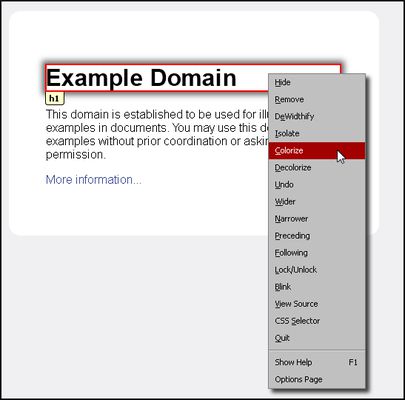
Quickly removing annoying or unnecessary elements from a page is pretty much the basic idea for this extension. Additional features allow for various manipulation of web elements.
Pretty similar to the 'Aardvark' and 'Element Hiding Helper for Adblock Plus' extensions.
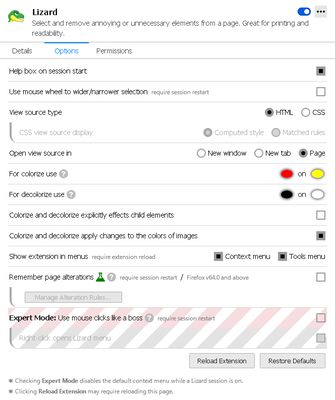
Start a Lizard session using the toolbar button or the Ctrl+Shift+L shortcut. The help box that will popup will provide you with all the information you'll need. It can also redirect you to the Options page (bottom link) for some tinkering.
◼ REMEMBER PAGE ALTERATIONS
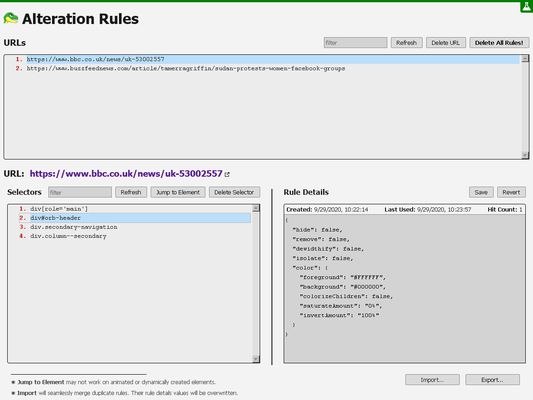
As of Lizard v1.20 changes to elements (removed, color, etc.) will be remembered and applied automatically when you revisit the web page.
This experimental feature can be activated from the extension Options page and is only available for Firefox version 64.0 and above.
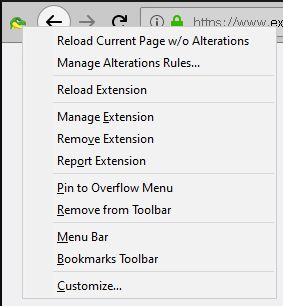
The feature also includes a dashboard to manage the alteration rules and can be accessed from the Options page or from the toolbar button context menu.
◼ PERMISSION JUSTIFICATION
● 'Access your data for all websites' – Select and modify page elements.
● 'Input data to the clipboard' – Support for clipboard Copy operations.
● 'Download files and read and modify the browser’s download history' – Export functionality.
● 'Display notifications to you' – Notifications.
● 'Access browser tabs' – Select and modify page elements.
● 'Access browser activity during navigation' – Reapply page alteration rules.
● "storage" – Storing extension preferences.
● "menus" – Add extension's items to browser menus.
◼ SUPPORT & FEEDBACK
https://discourse.mozilla.org/t/support-lizard-select-and-remove-annoying-elements/43449
Pretty similar to the 'Aardvark' and 'Element Hiding Helper for Adblock Plus' extensions.
Start a Lizard session using the toolbar button or the Ctrl+Shift+L shortcut. The help box that will popup will provide you with all the information you'll need. It can also redirect you to the Options page (bottom link) for some tinkering.
◼ REMEMBER PAGE ALTERATIONS
As of Lizard v1.20 changes to elements (removed, color, etc.) will be remembered and applied automatically when you revisit the web page.
This experimental feature can be activated from the extension Options page and is only available for Firefox version 64.0 and above.
The feature also includes a dashboard to manage the alteration rules and can be accessed from the Options page or from the toolbar button context menu.
◼ PERMISSION JUSTIFICATION
● 'Access your data for all websites' – Select and modify page elements.
● 'Input data to the clipboard' – Support for clipboard Copy operations.
● 'Download files and read and modify the browser’s download history' – Export functionality.
● 'Display notifications to you' – Notifications.
● 'Access browser tabs' – Select and modify page elements.
● 'Access browser activity during navigation' – Reapply page alteration rules.
● "storage" – Storing extension preferences.
● "menus" – Add extension's items to browser menus.
◼ SUPPORT & FEEDBACK
https://discourse.mozilla.org/t/support-lizard-select-and-remove-annoying-elements/43449
Avaliado em 4,7 por 1 revisor
Permissões e dados
Permissões necessárias:
- Enviar dados para área de transferência
- Fazer download de arquivos, ler e modificar o histórico de download do navegador
- Exibir notificações para você
- Acessar as abas do navegador
- Acessar atividades do navegador durante a navegação
- Acessar seus dados em todos os sites visitados
Mais informações
- Links da extensão
- Versão
- 1.20
- Tamanho
- 119 KB
- Ultima atualização
- há 5 anos (7 de dez de 2020)
- Categorias relacionadas
- Histórico de versões
- Etiquetas
- Adicionar a uma coleção
O desenvolvedor desta extensão pede que você ajude a apoiar seu desenvolvimento contínuo fazendo uma pequena contribuição.