
Batch Image Downloader por william
List all the images on the page and download them all with one click, filter by size.
7 usuários7 usuários
Metadados da extensão
Capturas de tela
Sobre esta extensão
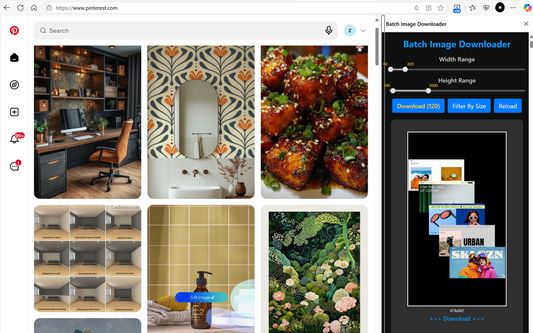
If you are used to downloading high-definition photos from Pinterest, Pixabay, Pexels, Burst and other image sites, then you definitely need this Batch Image Downloader.
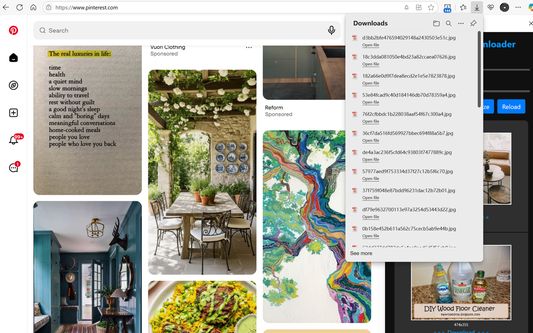
List all the images on the page and download them all with one click, it's free and efficient.
Supports PNG, JPEG, SVG, WEBP and other image formats, small image preview, one-click download.
You can filter images of specified size before downloading.
Features:
☆ Batch download all Images on the web page
☆ Filter by image size
☆ Support dynamically loaded images
☆ One-click download
☆ Persistent display in the sidebar
How to use the extension:
1. Open the web page, the number of images will be displayed on the extension icon.
2. Click the "download" button to download all images.
3. Filter by specified range of width and height and download all.
4. Or download a single image.
Note: Images encoded in BASE-64 cannot be downloaded (i.e., images starting with data:image).
If you can not find any image in top tabs, Please press Ctrl+F5 to force refresh it and reload sidebar.
List all the images on the page and download them all with one click, it's free and efficient.
Supports PNG, JPEG, SVG, WEBP and other image formats, small image preview, one-click download.
You can filter images of specified size before downloading.
Features:
☆ Batch download all Images on the web page
☆ Filter by image size
☆ Support dynamically loaded images
☆ One-click download
☆ Persistent display in the sidebar
How to use the extension:
1. Open the web page, the number of images will be displayed on the extension icon.
2. Click the "download" button to download all images.
3. Filter by specified range of width and height and download all.
4. Or download a single image.
Note: Images encoded in BASE-64 cannot be downloaded (i.e., images starting with data:image).
If you can not find any image in top tabs, Please press Ctrl+F5 to force refresh it and reload sidebar.
Avaliado em 0 por 1 revisor
Permissões e dados
Permissões necessárias:
- Bloquear conteúdo em qualquer página
- Fazer download de arquivos, ler e modificar o histórico de download do navegador
- Acessar as abas do navegador
- Acessar seus dados em todos os sites visitados
Permissões opcionais:
- Acessar seus dados em todos os sites visitados
Mais informações
- Versão
- 1.10
- Tamanho
- 172,25 KB
- Ultima atualização
- há 2 meses (13 de out de 2025)
- Categorias relacionadas
- Licença
- Mozilla Public License 2.0
- Histórico de versões
- Etiquetas
- Adicionar a uma coleção