Dodatki do przeglądarki Firefox
  • Rozszerzenia
  • Motywy
    • do Firefoksa
    • Słowniki i pakiety językowe
    • Inne strony
    • Dodatki na Androida
Zaloguj się
Podgląd „Highlighter for the Web - Mark my Word”

Highlighter for the Web - Mark my Word Autor: Mark my Word

Highlighter to mark text on any website on desktop and mobile with the Mark my Word browser extension for Firefox. Export the highlights to your favorite note-taking tool and keep what is important to you.

Dostępne w Firefoksie na Androida™Dostępne w Firefoksie na Androida™
4.4 (recenzje: 14)4.4 (recenzje: 14)
441 użytkowników441 użytkowników
Pobierz Firefoksa i to rozszerzenie
Pobierz plik

Metadane rozszerzenia

Zrzuty ekranu
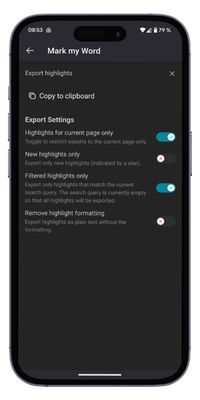
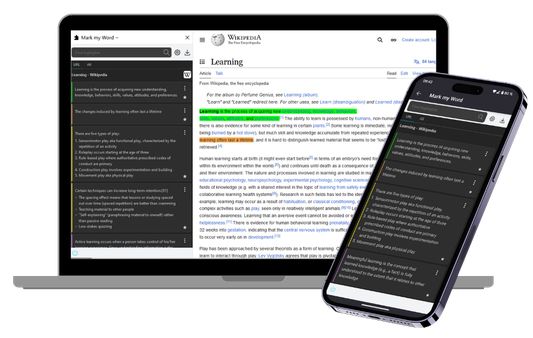
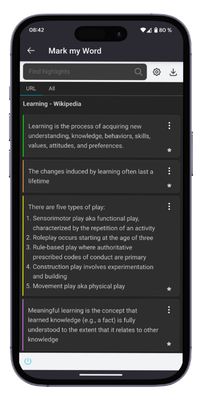
Create Highlight in Firefox and Firefox for Android .HighlightManageExport
O tym rozszerzeniu
Your essential web highlighter and annotation tool for Firefox. Effortlessly capture key information, add notes, and organize your research. Copy & paste formatted highlights directly into your favorite note-taking apps like Notion, Obsidian, Evernote, and more.

Mark my Word turns the web into your personal, organized library. Stop losing track of important information and level-up your research and learning workflow.

✨Capture & Annotate with Ease
  • Highlight Anywhere: Seamlessly highlight text on any website, from articles to forums.
  • Add Context: Add comments to any highlight to capture your thoughts and insights instantly.
  • Advanced Formatting: Use special formatting for lists, titles, or code snippets to keep your highlights structured and readable.
  • Control Your View: Hide or show highlights on a page to focus on what matters.

🗂️ Organize Your Knowledge
  • Powerful Sidebar: Manage all your highlights in one convenient sidebar.
  • Search & Filter: Quickly find any highlight you've ever made.
  • Folder Organization: Group your highlights by project, topic, or the system of your choice.
  • Custom Experience: Adjust the highlighter's colors, formats and behavior to fit your needs.

🚀 Export to Your Favorite Tools
  • One-Click Copy: Copy all your highlights to the clipboard in clean, formatted Markdown.
  • Seamless Integration: Paste directly into Notion, Obsidian, Evernote, Roam Research, Logseq, or any other Markdown-based tool.
  • Smart Export: Choose to export only the new highlights you haven't saved yet, preventing duplicates.
Ocenione na 4,4 przez 14 recenzentów
Zaloguj się, aby ocenić to rozszerzenie
Nie ma jeszcze ocen

Zapisano ocenę w gwiazdkach

5
11
4
1
3
0
2
1
1
1
14 recenzji
Uprawnienia i dane

Wymagane uprawnienia:

  • Umieszczać dane w schowku
  • Pobierać pliki oraz odczytywać i modyfikować historię pobranych plików przeglądarki
  • Mieć dostęp do kart przeglądarki
  • Mieć dostęp do danych użytkownika na wszystkich stronach
Więcej informacji
Więcej informacji
Strony dodatku
  • Domowa
  • Pomoc
  • Adres e-mail pomocy
Wersja
0.8.0
Rozmiar
351,63 KB
Ostatnia aktualizacja
5 miesięcy temu (3 lip 2025)
Powiązane kategorie
  • Kanały, wiadomości i blogi
  • Narzędzia wyszukiwania
  • Zakładki
Licencja
Wszelkie prawa zastrzeżone
Historia wersji
  • Wszystkie wersje
Etykiety
  • dark mode
  • search
Dodaj do kolekcji
Zgłoś ten dodatek
Strona domowa Mozilli

Dodatki

  • O serwisie
  • Blog dodatków do Firefoksa
  • Warsztat rozszerzeń
  • Strefa autora
  • Zasady programistów
  • Blog społeczności
  • Forum
  • Zgłoś błąd
  • Wytyczne recenzji

Przeglądarki

  • Desktop
  • Mobile
  • Enterprise

Produkty

  • Browsers
  • VPN
  • Relay
  • Monitor
  • Pocket
  • Bluesky (@firefox.com)
  • Instagram (Firefox)
  • YouTube (firefoxchannel)
  • Prywatność
  • Ciasteczka
  • Kwestie prawne

O ile nie wskazano inaczej, treść tej strony jest dostępna na warunkach licencji Creative Commons Attribution Share-Alike w wersji 3.0 lub nowszej. Android jest znakiem towarowym firmy Google LLC.