Bulk Select Google Photos Autor: App Alchemist
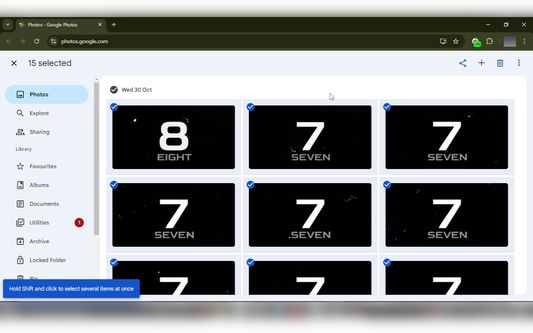
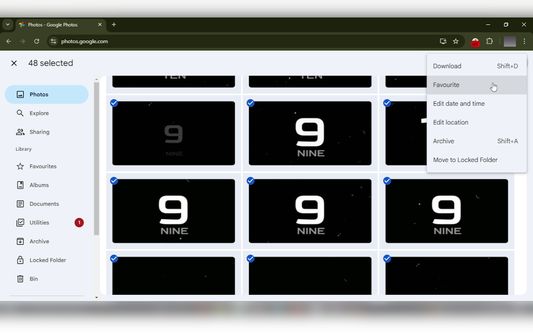
Select multiple photos on Google Photos with just one click and then bulk delete, download, archive, share etc.
Dostępne w Firefoksie na Androida™Dostępne w Firefoksie na Androida™
260 użytkowników260 użytkowników
Metadane rozszerzenia
Zrzuty ekranu
O tym rozszerzeniu
Bulk Select Google Photos is a powerful extension that enhances your experience on Google Photos by allowing you to easily select multiple photos at once for efficient management.
Note: On Android, you need to access the Google Photos website in desktop mode for the extension to work correctly.
Key Features:
* Bulk Selection: Quickly select multiple photos with a single click.
* Easy Management: Easily download, archive, share or delete google photos.
* User-Friendly Interface: Provides visual feedback by displaying an 'ON' badge during photo selection and an 'OFF' badge when not.
* Privacy: Works 100% locally and only on photos.google.com. Nothing leaves your browser.
How to Use:
1. Open Google Photos: Navigate to photos.google.com in your browser.
2. Click the Extension Icon: Click on the Bulk Select Google Photos extension icon to start selecting photos.
3. Scroll Through Your Photos: As you scroll, the extension will automatically select photos for you.
4. Pause Selection: Click the extension icon again to pause the selection process.
5. Resume Selection: Click the icon once more to resume selecting photos.
Note: On Android, you need to access the Google Photos website in desktop mode for the extension to work correctly.
Key Features:
* Bulk Selection: Quickly select multiple photos with a single click.
* Easy Management: Easily download, archive, share or delete google photos.
* User-Friendly Interface: Provides visual feedback by displaying an 'ON' badge during photo selection and an 'OFF' badge when not.
* Privacy: Works 100% locally and only on photos.google.com. Nothing leaves your browser.
How to Use:
1. Open Google Photos: Navigate to photos.google.com in your browser.
2. Click the Extension Icon: Click on the Bulk Select Google Photos extension icon to start selecting photos.
3. Scroll Through Your Photos: As you scroll, the extension will automatically select photos for you.
4. Pause Selection: Click the extension icon again to pause the selection process.
5. Resume Selection: Click the icon once more to resume selecting photos.
Ocenione na 5 przez 3 recenzentów
Uprawnienia i dane
Wymagane uprawnienia:
- Mieć dostęp do danych użytkownika na stronie „photos.google.com”
Więcej informacji
- Strony dodatku
- Wersja
- 1.40
- Rozmiar
- 44,73 KB
- Ostatnia aktualizacja
- 16 dni temu (21 lis 2025)
- Powiązane kategorie
- Licencja
- Wszelkie prawa zastrzeżone
- Historia wersji
- Dodaj do kolekcji
Autor tego rozszerzenia prosi o pomoc we wspieraniu jego rozwoju przez drobny datek.