
Nano Banana Pro - AI Image Editor door Plexigen AI
Create and edit images in browser with Nano Banana Pro. Edit images with natural language. Superior to Flux for consistent editing.
Sommige functies kunnen betaling vereisenSommige functies kunnen betaling vereisen
22 gebruikers22 gebruikers
Metagegevens van extensie
Schermafbeeldingen


Over deze extensie
🍌 Nano Banana Pro - Turn Ideas into Production-Ready Images.
✨ Transform your creative vision into stunning visuals, right from your browser. Simply right-click on any image and select the Nano Banana option from the context menu to start editing directly.
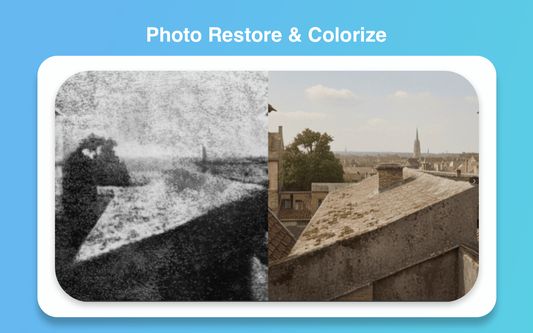
Fast, designer-focused AI image editor and generator powered by advanced models (Gemini 3). Generate high-quality images from text, restyle or refine existing photos, and manage every output in My Creations. Export final assets as PNG or JPEG - no context switching required.
Nano Banana Pro - Upgraded with Gemini 3 Pro for studio-quality precision, state-of-the-art text rendering in multiple languages, and advanced creative controls Google DeepMind. Perfect for complex compositions requiring the highest visual sophistication.
🎯 KEY FEATURES
📝 Text to Image
Create detailed images from natural language prompts. Control style, lighting, mood, camera angle, and composition with simple prompt modifiers.
🖼️ Image to Image
Upload a reference image to restyle, extend, or refine while preserving subject details and character consistency.
✨ Advanced Text Rendering
Generate clear, legible text in images - perfect for posters, diagrams, and product mockups. Support for multiple languages and sharp typography.
🎨 Multi-Image Composition
Combine up to 10 images into a single composition. Maintain consistency across up to 5 characters, blend references, and create complex mockups.
🎬 Studio-Quality Controls
Fine-tune lighting, camera settings, depth of field, and color grading. Enhanced prompt adherence for precise camera angles, bokeh, and lighting.
🖱️ Right-Click to Edit
Right-click any image on any webpage and select 'Edit with Nano Banana' for instant AI editing
📁 My Creations
Auto-save all creations, keep version history, and organize projects for easy reuse and export.
💾 Export Options
Export in PNG or JPEG with 10+ aspect ratios: Auto, 1:1, 9:16, 16:9, 3:4, 4:3, 3:2, 2:3, 5:4, 4:5, 21:9
🎨 Designer Workflows
Multi-image blending, relighting, background swaps, and naming/versioning to fit production pipelines.
⚡ Fast Iteration Loop
Preview → Refine → Export workflow for rapid concept development.
👥 WHO IT'S FOR
• Content Creators & Social Marketers - Producing visual assets at scale
• Designers & Product Teams - Fast iterations and consistent character/asset styling
• Hobbyists & Visual Artists - Prototyping ideas without switching between multiple tools
🚀 HOW TO GET STARTED (3 STEPS)
1️⃣ Click the extension icon to open dashboard panel and sign in to your account
2️⃣ Enter a prompt or upload an image and choose mode
3️⃣ Generate, refine, save to My Creations, or export as PNG/JPEG
💡 TIPS FOR BETTER RESULTS
✅ Be specific - Include style, lighting, camera angle, and mood in prompts
✅ Use reference images - For consistent characters or objects
✅ Save intermediate versions - To compare variations and iterate
🔒 PRIVACY & DATA
We respect your privacy. The extension processes images and prompts only with your permission. Generated outputs and uploaded images are stored according to your account settings - see our privacy policy on the website for details.
📚 SUPPORT & RESOURCES
Visit our website for prompt examples, tutorials, and support. For enterprise or large-volume needs, contact our team via the site.
❓ SHORT FAQ
Q: Do I need an account?
A: Yes. An account and sign-in are required to use the extension; cloud saves and advanced features are tied to your account.
Q: Can I use generated images commercially?
A: See Terms of Service and your account plan for usage rights.
Q: Does it work offline?
A: The extension uses remote models (Gemini 3 or Gemini 2.5), so an internet connection is required.
⭐ Start creating amazing visuals today with Nano Banana! ⭐
✨ Transform your creative vision into stunning visuals, right from your browser. Simply right-click on any image and select the Nano Banana option from the context menu to start editing directly.
Fast, designer-focused AI image editor and generator powered by advanced models (Gemini 3). Generate high-quality images from text, restyle or refine existing photos, and manage every output in My Creations. Export final assets as PNG or JPEG - no context switching required.
Nano Banana Pro - Upgraded with Gemini 3 Pro for studio-quality precision, state-of-the-art text rendering in multiple languages, and advanced creative controls Google DeepMind. Perfect for complex compositions requiring the highest visual sophistication.
🎯 KEY FEATURES
📝 Text to Image
Create detailed images from natural language prompts. Control style, lighting, mood, camera angle, and composition with simple prompt modifiers.
🖼️ Image to Image
Upload a reference image to restyle, extend, or refine while preserving subject details and character consistency.
✨ Advanced Text Rendering
Generate clear, legible text in images - perfect for posters, diagrams, and product mockups. Support for multiple languages and sharp typography.
🎨 Multi-Image Composition
Combine up to 10 images into a single composition. Maintain consistency across up to 5 characters, blend references, and create complex mockups.
🎬 Studio-Quality Controls
Fine-tune lighting, camera settings, depth of field, and color grading. Enhanced prompt adherence for precise camera angles, bokeh, and lighting.
🖱️ Right-Click to Edit
Right-click any image on any webpage and select 'Edit with Nano Banana' for instant AI editing
📁 My Creations
Auto-save all creations, keep version history, and organize projects for easy reuse and export.
💾 Export Options
Export in PNG or JPEG with 10+ aspect ratios: Auto, 1:1, 9:16, 16:9, 3:4, 4:3, 3:2, 2:3, 5:4, 4:5, 21:9
🎨 Designer Workflows
Multi-image blending, relighting, background swaps, and naming/versioning to fit production pipelines.
⚡ Fast Iteration Loop
Preview → Refine → Export workflow for rapid concept development.
👥 WHO IT'S FOR
• Content Creators & Social Marketers - Producing visual assets at scale
• Designers & Product Teams - Fast iterations and consistent character/asset styling
• Hobbyists & Visual Artists - Prototyping ideas without switching between multiple tools
🚀 HOW TO GET STARTED (3 STEPS)
1️⃣ Click the extension icon to open dashboard panel and sign in to your account
2️⃣ Enter a prompt or upload an image and choose mode
3️⃣ Generate, refine, save to My Creations, or export as PNG/JPEG
💡 TIPS FOR BETTER RESULTS
✅ Be specific - Include style, lighting, camera angle, and mood in prompts
✅ Use reference images - For consistent characters or objects
✅ Save intermediate versions - To compare variations and iterate
🔒 PRIVACY & DATA
We respect your privacy. The extension processes images and prompts only with your permission. Generated outputs and uploaded images are stored according to your account settings - see our privacy policy on the website for details.
📚 SUPPORT & RESOURCES
Visit our website for prompt examples, tutorials, and support. For enterprise or large-volume needs, contact our team via the site.
❓ SHORT FAQ
Q: Do I need an account?
A: Yes. An account and sign-in are required to use the extension; cloud saves and advanced features are tied to your account.
Q: Can I use generated images commercially?
A: See Terms of Service and your account plan for usage rights.
Q: Does it work offline?
A: The extension uses remote models (Gemini 3 or Gemini 2.5), so an internet connection is required.
⭐ Start creating amazing visuals today with Nano Banana! ⭐
Met 5 gewaardeerd door 1 beoordelaar
Toestemmingen en gegevens
Vereiste machtigingen:
- Bestanden downloaden en downloadgeschiedenis van de browser lezen en aanpassen
- Browsertabbladen benaderen
- Uw gegevens voor alle websites benaderen
Meer informatie
- Add-on-koppelingen
- Versie
- 1.7.1
- Grootte
- 282,93 KB
- Laatst bijgewerkt
- 10 dagen geleden (29 nov. 2025)
- Verwante categorieën
- Licentie
- Alle rechten voorbehouden
- Privacybeleid
- Het privacybeleid voor deze add-on lezen
- Versiegeschiedenis
- Toevoegen aan collectie