Highlight av Weave-Trix
Highlight text on websites by toggling the highlighter extension or keyboard shortcut. Saves highlights on your device for future references.
4 856 brukere4 856 brukere
Metadata for utvidelser
Skjermbilder
Om denne utvidelsen
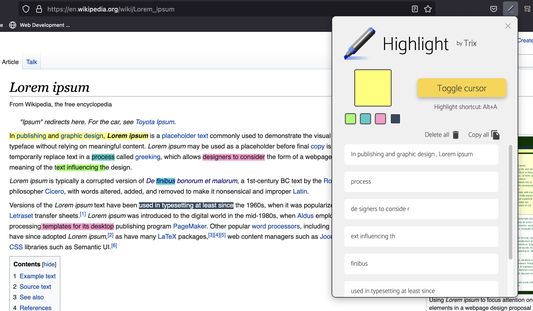
User can toggle the highlighter cursor using shortcut key Ctrl + A or toggling the button in the extension popup.
Close the highlighter cursor by clicking or toggling the highlighter again.
Select phrases to be highlighted with the cursor.
Selected phrases will be saved to the device and can be managed through the pop-up interface.
Highlight color can be switched between 5 different preset colors.
All highlighted phrases can be copied or deleted in the pop-up interface.
When the cursor hover over the highlighted phrases in the webpage, a quick selection menu will appear to let user easily Delete, Switch Color, or Copy.
Close the highlighter cursor by clicking or toggling the highlighter again.
Select phrases to be highlighted with the cursor.
Selected phrases will be saved to the device and can be managed through the pop-up interface.
Highlight color can be switched between 5 different preset colors.
All highlighted phrases can be copied or deleted in the pop-up interface.
When the cursor hover over the highlighted phrases in the webpage, a quick selection menu will appear to let user easily Delete, Switch Color, or Copy.
Vurdert til 3,9 av 43 anmeldere
Tillatelser og data
Mer informasjon
- Lenker for utvidelser
- Versjon
- 4.0.3
- Størrelse
- 4,69 MB
- Sist oppdatert
- 3 år siden (6. juli 2022)
- Relaterte kategorier
- Lisens
- MIT License
- Versjonshistorikk
- Legg til i samling