
Hide n' Seek ავტორი damianmgarcia.com
View the jobs you seek. Hide the ones you don't. Easily hide promoted jobs and companies on LinkedIn, Indeed, and Glassdoor.
513 მომხმარებელი513 მომხმარებელი
გაფართოების მონაცემები
ეკრანის სურათები


გაფართოების შესახებ
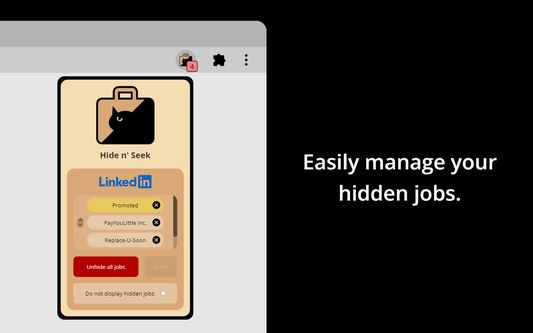
Hide n' Seek lets you easily remove promoted job postings and companies from your search results on LinkedIn, Indeed, and Glassdoor. You can also block job listings by keyword.
⭐ How it works
“Block” buttons are added next to every listing. If you see a listing you don’t like, simply click the button to hide it. By default, the listing will be hidden under an overlay. Alternatively, you can completely eliminate it from search results by enabling the “Do not display hidden jobs” option.
To hide promoted jobs, click the “block” button on any promoted listing and then activate the “Promoted” toggle.
To hide jobs by keyword, visit one of the supported job boards, click the Hide n' Seek button on your browser's toolbar, and then add keywords using the "Block by keyword" field.
You can also view a list of everything you've hidden, and backup and restore your data by clicking the Hide n’ Seek button on your browser’s toolbar.
🔒 Privacy
Your data remains completely private and is never shared. All data is stored locally on your device and may sync across your devices if browser synchronization is enabled.
🔑 Permissions
Hide n' Seek requires browser permissions to function. When you first try to use it on a job board, you'll be asked to grant permissions.
"Read and change your data on all {Job Board} sites"
This permission allows the addition of "Block" buttons and other UI elements to listings.
"Read your browsing history"
This permission enables the detection of LinkedIn, Indeed, and Glassdoor so the extension knows when to look for listings.
Permissions are granted for a specific job board, so if you use multiple job boards, such as LinkedIn and Indeed, you'll need to grant permissions for each one individually.
Some job boards, such as Glassdoor, use many country-specific domains (for example glassdoor.com, glassdoor.co.uk, glassdoor.ca), and in these cases Hide n' Seek will ask for permissions for all the domains used by the job board.
⭐ How it works
“Block” buttons are added next to every listing. If you see a listing you don’t like, simply click the button to hide it. By default, the listing will be hidden under an overlay. Alternatively, you can completely eliminate it from search results by enabling the “Do not display hidden jobs” option.
To hide promoted jobs, click the “block” button on any promoted listing and then activate the “Promoted” toggle.
To hide jobs by keyword, visit one of the supported job boards, click the Hide n' Seek button on your browser's toolbar, and then add keywords using the "Block by keyword" field.
You can also view a list of everything you've hidden, and backup and restore your data by clicking the Hide n’ Seek button on your browser’s toolbar.
🔒 Privacy
Your data remains completely private and is never shared. All data is stored locally on your device and may sync across your devices if browser synchronization is enabled.
🔑 Permissions
Hide n' Seek requires browser permissions to function. When you first try to use it on a job board, you'll be asked to grant permissions.
"Read and change your data on all {Job Board} sites"
This permission allows the addition of "Block" buttons and other UI elements to listings.
"Read your browsing history"
This permission enables the detection of LinkedIn, Indeed, and Glassdoor so the extension knows when to look for listings.
Permissions are granted for a specific job board, so if you use multiple job boards, such as LinkedIn and Indeed, you'll need to grant permissions for each one individually.
Some job boards, such as Glassdoor, use many country-specific domains (for example glassdoor.com, glassdoor.co.uk, glassdoor.ca), and in these cases Hide n' Seek will ask for permissions for all the domains used by the job board.
4,7 შეფასება 7 მიმომხილველისგან
ნებართვები და მონაცემები
დამატებითი მონაცემები
- დამატების ბმულები
- ვერსია
- 7.1.3
- ზომა
- 169,23 კბ
- ბოლო განახლება
- 13 საათის წინ (7 დეკ 2025)
- მსგავსი კატეგორიები
- ლიცენზია
- All Rights Reserved (ყველა უფლება დაცულია)
- ვერსიის ისტორია
- ჭდეები
- კრებულში დამატება