
Batch Image Downloader per william
List all the images on the page and download them all with one click, filter by size.
7 Usatores7 Usatores
Metadatos del extension
Capturas de schermo
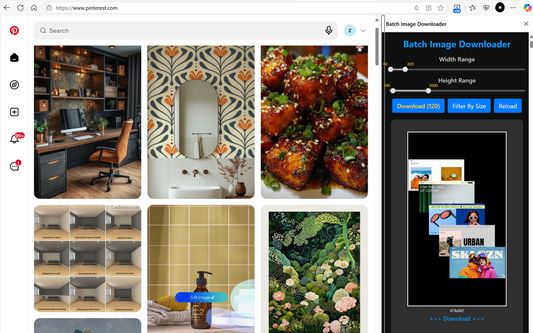
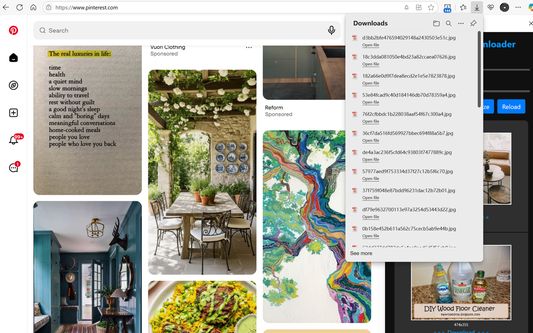
A proposito de iste extension
If you are used to downloading high-definition photos from Pinterest, Pixabay, Pexels, Burst and other image sites, then you definitely need this Batch Image Downloader.
List all the images on the page and download them all with one click, it's free and efficient.
Supports PNG, JPEG, SVG, WEBP and other image formats, small image preview, one-click download.
You can filter images of specified size before downloading.
Features:
☆ Batch download all Images on the web page
☆ Filter by image size
☆ Support dynamically loaded images
☆ One-click download
☆ Persistent display in the sidebar
How to use the extension:
1. Open the web page, the number of images will be displayed on the extension icon.
2. Click the "download" button to download all images.
3. Filter by specified range of width and height and download all.
4. Or download a single image.
Note: Images encoded in BASE-64 cannot be downloaded (i.e., images starting with data:image).
If you can not find any image in top tabs, Please press Ctrl+F5 to force refresh it and reload sidebar.
List all the images on the page and download them all with one click, it's free and efficient.
Supports PNG, JPEG, SVG, WEBP and other image formats, small image preview, one-click download.
You can filter images of specified size before downloading.
Features:
☆ Batch download all Images on the web page
☆ Filter by image size
☆ Support dynamically loaded images
☆ One-click download
☆ Persistent display in the sidebar
How to use the extension:
1. Open the web page, the number of images will be displayed on the extension icon.
2. Click the "download" button to download all images.
3. Filter by specified range of width and height and download all.
4. Or download a single image.
Note: Images encoded in BASE-64 cannot be downloaded (i.e., images starting with data:image).
If you can not find any image in top tabs, Please press Ctrl+F5 to force refresh it and reload sidebar.
Valutate 0 per 0 revisores
Permissiones e datos
Permissiones necessari:
- Bloccar le contento in tote pagina
- Discargar files e leger e modificar le chronologia de discargamentos del navigator
- Accede al schedas del navigator
- Acceder a tu datos pro tote le sitos web
Permissiones optional:
- Acceder a tu datos pro tote le sitos web
Plus de informationes
- Version
- 1.10
- Dimension
- 172,25 KB
- Ultime actualisation
- 2 muaj më parë (13 Tet 2025)
- Categorias associate
- Licentia
- Licentia public Mozilla 2.0
- Historia de versiones
- Etiquettas
- Adder al collection