
Wappify szerző: Kris Kuiper
Allows any website to be installed and launched as a true standalone full-screen app, instead of just a browser shortcut.
7 felhasználó7 felhasználó
Kiegészítő metaadatai
Képernyőképek




A kiegészítő névjegye
Firefox includes a built-in "Add app to Home Screen" option.
However, this feature isn’t always available and will only show the option "Add To Home Screen", because many websites aren’t properly configured to support it.
In those cases, the site can only be added as a regular shortcut and when opened, it appears in a normal brower tab — with the address bar visible, just like any other website.
Wappify makes it possible to install those websites as real apps.
It automatically provides the browser with the details it needs — such as the site’s name, colors, and icon — so you can launch it in full screen, without the address bar, as a true standalone app.
Plus, all your favorite browser extensions remain active while using it.
Tutorial:
1. Install the Wappify browser extension.
2. Visit any website you’d like to turn into an app.
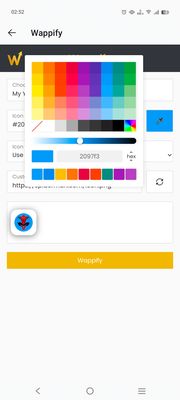
3. Open the Wappify extension, customize the app title and icon, then click on "Wappify".
4. The page will automatically reload.
5. Tap the ⋮ menu icon in your browser.
6. Select "Add app to Home screen" or "Install app".
An icon will appear on your home screen. Tap it anytime to open this site directly.
Now enjoy the website as a full screen app with all favorite other browser extensions active.
However, this feature isn’t always available and will only show the option "Add To Home Screen", because many websites aren’t properly configured to support it.
In those cases, the site can only be added as a regular shortcut and when opened, it appears in a normal brower tab — with the address bar visible, just like any other website.
Wappify makes it possible to install those websites as real apps.
It automatically provides the browser with the details it needs — such as the site’s name, colors, and icon — so you can launch it in full screen, without the address bar, as a true standalone app.
Plus, all your favorite browser extensions remain active while using it.
Tutorial:
1. Install the Wappify browser extension.
2. Visit any website you’d like to turn into an app.
3. Open the Wappify extension, customize the app title and icon, then click on "Wappify".
4. The page will automatically reload.
5. Tap the ⋮ menu icon in your browser.
6. Select "Add app to Home screen" or "Install app".
An icon will appear on your home screen. Tap it anytime to open this site directly.
Now enjoy the website as a full screen app with all favorite other browser extensions active.
Értékelés 0 szerkesztő által: 0
Engedélyek és adatok
Szükséges engedélyek:
- Bármely oldalon lévő tartalom blokkolása
- Böngészőlapok elérése
- Az adatai elérése az összes webhelyhez
Nem kötelező engedélyek:
- Az adatai elérése az összes webhelyhez
Adatgyűjtés:
- A fejlesztő szerint ez a kiegészítő nem igényel adatgyűjtést.
További információk
- Verzió
- 1.2.2
- Méret
- 231,2 kB
- Legutóbb frissítve
- egy hónapja (2025. nov. 4.)
- Kapcsolódó kategóriák
- Licenc
- Minden jog fenntartva
- Verziótörténet
- Gyűjteményhez adás