
Rotate Youtube Video (+ Zoom / Mirror, AB Loop) troch znwyrz
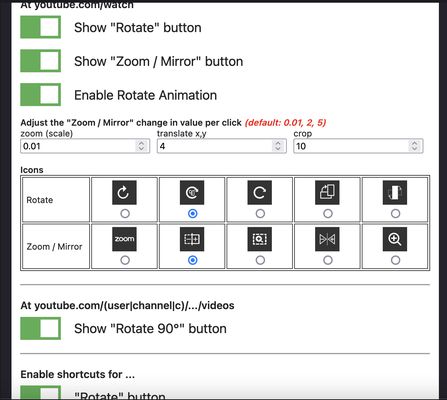
You can rotate, zoom, mirror, or A-B loop the video. See the full details at the bottom of this page, or press the shortcut Ctrl + Shift + 1 after installing the add-on to open the add-on preferences.
4.313 brûkers4.313 brûkers
Metadata útwreiding
Skermôfbyldingen

Oer dizze útwreiding
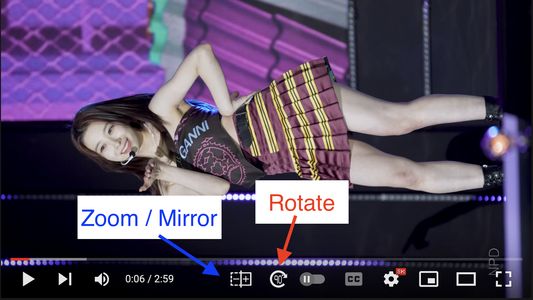
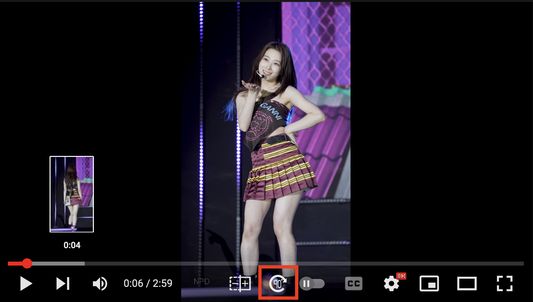
Rotate
- support 0°, 90°, 180°, 270°
- affect Youtube video preview
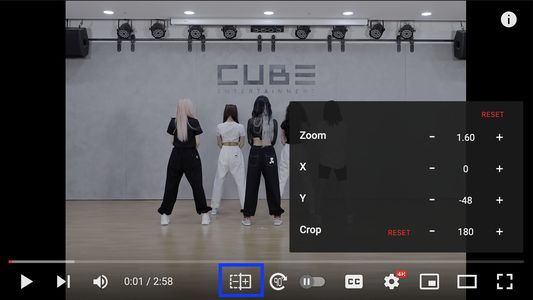
Zoom / Mirror
- support zoom (scale), translate x,y , crop, mirror (flip)
- support long press +,- button
* the value will be reset after pressing the reset button or the rotate button
* not affect Youtube video preview
* need to adjust value for normal mode and full screen mode
AB Loop
- set marker start/end by shift + click the button
- click the button to toggle menu
- support multiple markers and loop all markers in order
- To view your Saved Markers, click the Action Button on the toolbar
* If ads play while the loop is active, the AB Loop button and shortcuts will be disabled until the ads end
Shortcuts
- Rotate : ctrl+shift+9
- Zoom in : ctrl+shift+.
- Zoom out : ctrl+shift+,
- Move left : ctrl+shift+arrow-left
- Move right : ctrl+shift+arrow-right
- Move up : ctrl+shift+arrow-up
- Move down : ctrl+shift+arrow-down
- Mirror : ctrl+shift+8
- Reset Zoom/Move/Mirror Options : ctrl+shift+7
- Center Zoomed Video
- Set ABLoop Marker, Set Single ABLoop Marker, Set Single A-to-End Loop Marker
- Start/Restart ABLoop, Stop ABLoop
- Toggle ABLoop Menu, Clear All Markers
Shortcuts with mouse
- Zoom : on player > shift+scroll
- Move : on player > shift+left-click+move
- Move (Lock Axis) : on player >
• Windows/Linux : shift+ctrl+left-click+move
• Mac : shift+alt+left-click+move
- Reset Zoom/Move/Crop/Mirror : on player > shift+middle-click
You can change Shortcuts via Manage Extension Shortcuts
- How to Manage extension shortcuts : <a href="https://support.mozilla.org/en-US/kb/manage-extension-shortcuts-firefox" target="_blank">link</a>
- Possible Key Combinations : <a href="https://developer.mozilla.org/en-US/Add-ons/WebExtensions/manifest.json/commands#Key_combinations" target="_blank">link</a>
- support 0°, 90°, 180°, 270°
- affect Youtube video preview
Zoom / Mirror
- support zoom (scale), translate x,y , crop, mirror (flip)
- support long press +,- button
* the value will be reset after pressing the reset button or the rotate button
* not affect Youtube video preview
* need to adjust value for normal mode and full screen mode
AB Loop
- set marker start/end by shift + click the button
- click the button to toggle menu
- support multiple markers and loop all markers in order
- To view your Saved Markers, click the Action Button on the toolbar
* If ads play while the loop is active, the AB Loop button and shortcuts will be disabled until the ads end
Shortcuts
- Rotate : ctrl+shift+9
- Zoom in : ctrl+shift+.
- Zoom out : ctrl+shift+,
- Move left : ctrl+shift+arrow-left
- Move right : ctrl+shift+arrow-right
- Move up : ctrl+shift+arrow-up
- Move down : ctrl+shift+arrow-down
- Mirror : ctrl+shift+8
- Reset Zoom/Move/Mirror Options : ctrl+shift+7
- Center Zoomed Video
- Set ABLoop Marker, Set Single ABLoop Marker, Set Single A-to-End Loop Marker
- Start/Restart ABLoop, Stop ABLoop
- Toggle ABLoop Menu, Clear All Markers
Shortcuts with mouse
- Zoom : on player > shift+scroll
- Move : on player > shift+left-click+move
- Move (Lock Axis) : on player >
• Windows/Linux : shift+ctrl+left-click+move
• Mac : shift+alt+left-click+move
- Reset Zoom/Move/Crop/Mirror : on player > shift+middle-click
You can change Shortcuts via Manage Extension Shortcuts
- How to Manage extension shortcuts : <a href="https://support.mozilla.org/en-US/kb/manage-extension-shortcuts-firefox" target="_blank">link</a>
- Possible Key Combinations : <a href="https://developer.mozilla.org/en-US/Add-ons/WebExtensions/manifest.json/commands#Key_combinations" target="_blank">link</a>
Wurdearre: 4,2 troch 108 beoardielers
Tastimmingen en gegevens
Fereaske machtigingen:
- Utwreidingsgebrûk beweitsje en tema’s beheare
- Browserljepblêden benaderje
- Browseraktiviteit wylst navigearjen benaderje
- Jo gegevens foar www.youtube.com benaderje
Opsjonele machtigingen:
- Jo gegevens foar www.youtube.com benaderje
Mear ynformaasje
- Add-on-keppelingen
- Ferzje
- 6.2.1.0
- Grutte
- 8,9 MB
- Lêst bywurke
- ien moanne lyn (28 okt. 2025)
- Sibbe kategoryen
- Ferzjeskiednis
- Tafoegje oan kolleksje