Fast Tab Switcher troch A.Volinsky
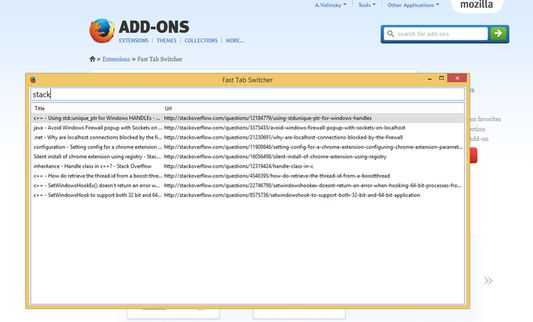
Fast Tab Switcher allows you to find and switch to any tab immediately. It is very useful if you have multiple windows and/or lots of tabs opened. Just press Ctrl+Space!
658 brûkers658 brûkers
Metadata útwreiding
Skermôfbyldingen
Oer dizze útwreiding
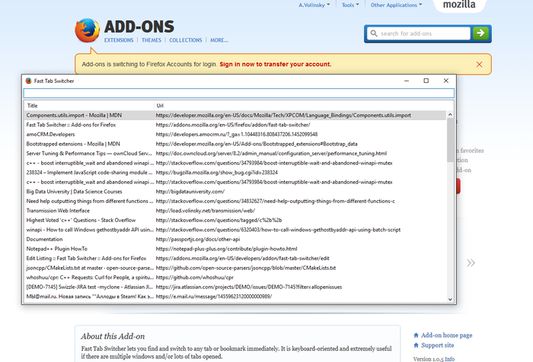
Fast Tab Switcher allows you to find and switch to any tab immediately. It is keyboard-oriented and very useful if you have multiple windows and/or lots of tabs opened. Just press Ctrl+Space by default.
Hotkey combination opens the popup window with tab list. Start typing the title or url (any part or word) of the tab you would like to switch to and press Enter.
- Tab list is filtering as you are typing
- Tab list is sorted in MRU order (most recent tabs first)
- Tab list contains all tabs in every browser window
- You can close selected tab by pressing Ctrl+Delete (or Cmd+Delete on OSX)
Version history: http://tapapax.github.io/firefox-fts/
https://github.com/tapapax/firefox-fts
Hotkey combination opens the popup window with tab list. Start typing the title or url (any part or word) of the tab you would like to switch to and press Enter.
- Tab list is filtering as you are typing
- Tab list is sorted in MRU order (most recent tabs first)
- Tab list contains all tabs in every browser window
- You can close selected tab by pressing Ctrl+Delete (or Cmd+Delete on OSX)
Version history: http://tapapax.github.io/firefox-fts/
https://github.com/tapapax/firefox-fts
Wurdearre: 4,8 troch 40 beoardielers
Tastimmingen en gegevens
Mear ynformaasje
- Add-on-keppelingen
- Ferzje
- 2.7.0
- Grutte
- 56,2 KB
- Lêst bywurke
- 6 jierren lyn (22 apr. 2020)
- Sibbe kategoryen
- Ferzjeskiednis
- Tafoegje oan kolleksje