Bulk Select Google Photos troch App Alchemist
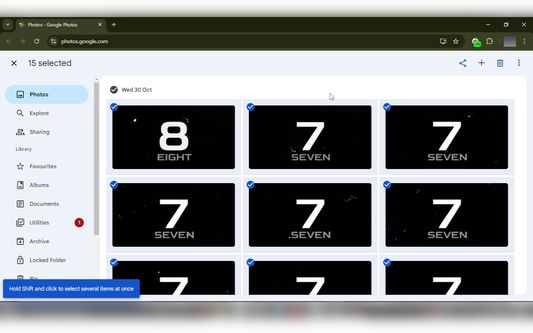
Select multiple photos on Google Photos with just one click and then bulk delete, download, archive, share etc.
Beskikber yn Firefox foar Android™Beskikber yn Firefox foar Android™
259 brûkers259 brûkers
Metadata útwreiding
Skermôfbyldingen
Oer dizze útwreiding
Bulk Select Google Photos is a powerful extension that enhances your experience on Google Photos by allowing you to easily select multiple photos at once for efficient management.
Note: On Android, you need to access the Google Photos website in desktop mode for the extension to work correctly.
Key Features:
* Bulk Selection: Quickly select multiple photos with a single click.
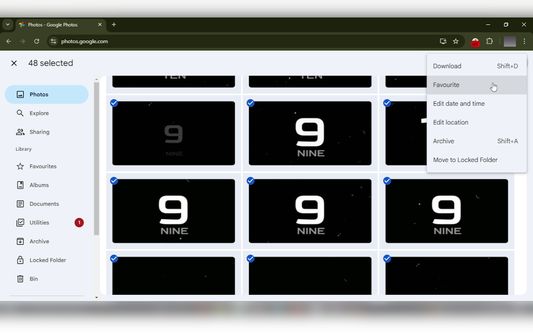
* Easy Management: Easily download, archive, share or delete google photos.
* User-Friendly Interface: Provides visual feedback by displaying an 'ON' badge during photo selection and an 'OFF' badge when not.
* Privacy: Works 100% locally and only on photos.google.com. Nothing leaves your browser.
How to Use:
1. Open Google Photos: Navigate to photos.google.com in your browser.
2. Click the Extension Icon: Click on the Bulk Select Google Photos extension icon to start selecting photos.
3. Scroll Through Your Photos: As you scroll, the extension will automatically select photos for you.
4. Pause Selection: Click the extension icon again to pause the selection process.
5. Resume Selection: Click the icon once more to resume selecting photos.
Note: On Android, you need to access the Google Photos website in desktop mode for the extension to work correctly.
Key Features:
* Bulk Selection: Quickly select multiple photos with a single click.
* Easy Management: Easily download, archive, share or delete google photos.
* User-Friendly Interface: Provides visual feedback by displaying an 'ON' badge during photo selection and an 'OFF' badge when not.
* Privacy: Works 100% locally and only on photos.google.com. Nothing leaves your browser.
How to Use:
1. Open Google Photos: Navigate to photos.google.com in your browser.
2. Click the Extension Icon: Click on the Bulk Select Google Photos extension icon to start selecting photos.
3. Scroll Through Your Photos: As you scroll, the extension will automatically select photos for you.
4. Pause Selection: Click the extension icon again to pause the selection process.
5. Resume Selection: Click the icon once more to resume selecting photos.
Wurdearre: 5 troch 3 beoardielers
Tastimmingen en gegevens
Mear ynformaasje
- Add-on-keppelingen
- Ferzje
- 1.40
- Grutte
- 44,73 KB
- Lêst bywurke
- 18 dagen lyn (21 nov. 2025)
- Sibbe kategoryen
- Lisinsje
- Alle rjochten foarbehâlden
- Ferzjeskiednis
- Tafoegje oan kolleksje
De ûnwikkeler fan dizze útwreiding freget om stipe foar de trochgeande ûntwikkeling troch it meitsjen fan in lytse bydrage.