
Theme Font & Size Changer di Baris Derin, Access Firefox Project
Theme Font & Size Changer lets you change the global font size and font family used for the user interface in Firefox. Design your browser with your favorite font.
5.833 utents5.833 utents
Metadâts de estension
Schermadis





Informazions su la estension
THUNDERBIRD USERS PLEASE SWITCH TO THE NEW THUNDERBIRD VERSION BY BELOW URL:
https://03.yfhome.xyz/en-US/firefox/addon/theme-font-size-changer-for-tb/
Theme Font & Size Changer is a simple browser tool that lets you change the font size and font family of Firefox and several other Mozilla products. It is especially valuable tool for visually impaired people and wide screen users.
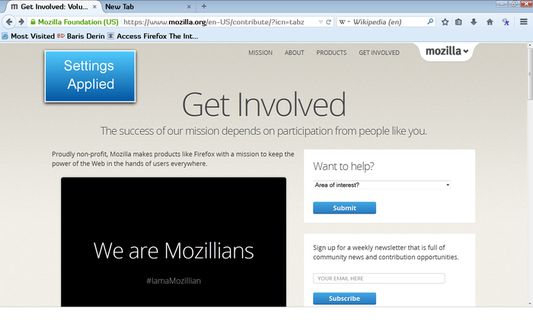
Different from add-ons that enlarge and reduce text on web pages, Theme Font & Size Changer changes the font size and font family in all windows, menus, toolbars, etc within Firefox itself. All font size, font family, and other changes are applied instantly and they are saved permanently and through sessions. You may assign your favorite font into your browser interface and change its size as you wish.
It was initially created to be an accessibility aid for persons with visual impairments and for those without perfect eyesight, but it's also useful for Firefox users with high resolution settings and wide screens.
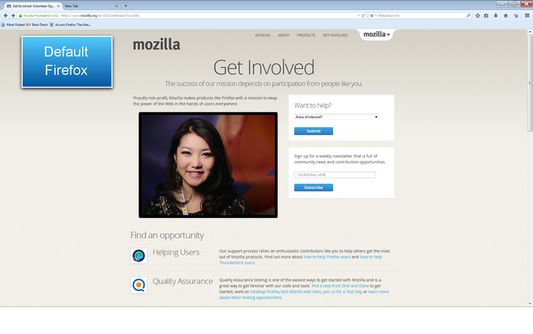
While Theme Font & Size Changer was written to be used with Firefox default theme, it does work with other non-default themes, but you may come across issues where some elements within Firefox retain the (non-default) font size setting that the theme developer chose for their theme.
There are two places that you can manage the global font size and font family of Firefox via Theme Font & Size Changer:
Theme Font & Size Changer Settings
Theme Font & Size Changer also allows you to change the global font size and font family for the user interface in Thunderbird and SeaMonkey.
FIREFOX USERS:
---------------------------------------------------------------
THUNDERBIRD USERS:
Installation for Thunderbird:
Please follow Tools > Add-ons pathway from Thunderbird Menu at the top.
Add-ons page will open up.
Click Extensions at the left sidebar.
Click Search box at the top right and type Theme Font Size Changer. Press Enter.
Find the Theme Font & Size Changer add-on in the search results.
Click Install button.
---------------------------------------------------------------
SEAMONKEY USERS:
Please do not send your support or help questions as review.
You may send your your support or help questions to:
http://barisderin.com/?p=287
If you enjoy Theme Font & Size Changer, please feel free to leave a comment or rating, and share it with your friends and family.
Special thanks to Ken Saunders for the priceless contributions and testing efforts.
---------------------------------------------------------------
If you have any support questions, feature requests and bug reports, please do not hesitate to contact us by below support email address:
support at barisderin dot com
Regards,
Baris Derin
https://03.yfhome.xyz/en-US/firefox/addon/theme-font-size-changer-for-tb/
Theme Font & Size Changer is a simple browser tool that lets you change the font size and font family of Firefox and several other Mozilla products. It is especially valuable tool for visually impaired people and wide screen users.
Different from add-ons that enlarge and reduce text on web pages, Theme Font & Size Changer changes the font size and font family in all windows, menus, toolbars, etc within Firefox itself. All font size, font family, and other changes are applied instantly and they are saved permanently and through sessions. You may assign your favorite font into your browser interface and change its size as you wish.
It was initially created to be an accessibility aid for persons with visual impairments and for those without perfect eyesight, but it's also useful for Firefox users with high resolution settings and wide screens.
While Theme Font & Size Changer was written to be used with Firefox default theme, it does work with other non-default themes, but you may come across issues where some elements within Firefox retain the (non-default) font size setting that the theme developer chose for their theme.
There are two places that you can manage the global font size and font family of Firefox via Theme Font & Size Changer:
- Toolbar Button: Click on the Theme Font & Size Changer button to open up Theme Font & Size Changer settings panel.
- Tools Option: Choose Tools menu from Firefox Menu Bar and click on the Theme Font & Size Changer option. It will open up Theme Font & Size Changer settings panel.
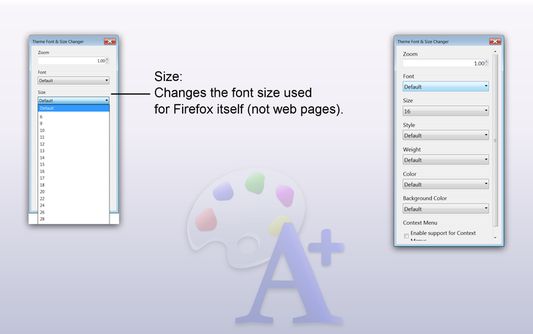
Theme Font & Size Changer Settings
- Zoom: This is a global zoom feature that enlarges/zooms both Firefox itself (including buttons and icons), and web page content simultaneously.
- Font: Changes the font family used for Firefox itself (not web pages).
- No fonts are installed by Them Font & Size Changer --------------------------------
- Size: Changes the font size used for Firefox itself (not web pages).
- Style: Changes the font style for Firefox to Italic.
- Weight: Changes the font weight for Firefox to Bold.
- Color: Changes the font color for Firefox.
- Background Color: Changes the background color of the top toolbars.
- Context Menu: Applies Background Color selection to context menus.
The default Firefox full page zoom controls can still be used independently.
--------------------------------
The fonts installed on your system are displayed and can be used.
--------------------------------
--------------------------------
--------------------------------
--------------------------------
--------------------------------
Theme Font & Size Changer also allows you to change the global font size and font family for the user interface in Thunderbird and SeaMonkey.
FIREFOX USERS:
- The Theme Font & Size Changer button is added to the right side of the Navigation Toolbar by default. You can move it to any toolbar that you wish including the Status Bar by right clicking on a toolbar, selecting Customize, and dragging the icon to the toolbar of your choice.
---------------------------------------------------------------
THUNDERBIRD USERS:
- Statusbar Bar Button: Click on the Theme Font & Size Changer button inside your Thunderbird status-bar.
- Tools Option: Choose Tools menu from Thunderbird Menu Bar and click on the Theme Font & Size Changer option. It will open up Theme Font & Size Changer settings panel.
Installation for Thunderbird:
Please follow Tools > Add-ons pathway from Thunderbird Menu at the top.
Add-ons page will open up.
Click Extensions at the left sidebar.
Click Search box at the top right and type Theme Font Size Changer. Press Enter.
Find the Theme Font & Size Changer add-on in the search results.
Click Install button.
---------------------------------------------------------------
SEAMONKEY USERS:
- Statusbar Bar Button: Click on the Theme Font & Size Changer button inside your Thunderbird status-bar.
- Toolbar Button: It is optional so it is not visible as default. If you want to place a Toolbar Button, right click on a toolbar button like Home Button, then choose Customize option. A window will pop up. Find the Theme Font & Size Changer button, then click and drag the Theme Font & Size Changer button in the toolbar of your choice and drop the button. Clicking on this Theme Font & Size Changer button will open up Theme Font & Size Changer settings panel.
Please do not send your support or help questions as review.
You may send your your support or help questions to:
http://barisderin.com/?p=287
If you enjoy Theme Font & Size Changer, please feel free to leave a comment or rating, and share it with your friends and family.
Special thanks to Ken Saunders for the priceless contributions and testing efforts.
---------------------------------------------------------------
If you have any support questions, feature requests and bug reports, please do not hesitate to contact us by below support email address:
support at barisderin dot com
Regards,
Baris Derin
Valutât 2,2 di 225 recensôrs
Permès e dâts
Permès obligatoris:
- Discjariâ files, lei e modificâ la cronologjie dai discjamâts dal navigadôr
- Monitorâ l’ûs des estensions e gjestî i temis
- Acedi aes schedis dal navigadôr
- Acedi ai tiei dâts di ducj i sîts web
Altris informazions
- Colegaments component adizionâl
- Version
- 62.1resigned1
- Dimension
- 233,92 kB
- Ultin inzornament
- 2 vite më parë (25 Pri 2024)
- Categoriis coreladis
- Cronologjie versions
- Zonte ae racuelte
http://barisderin.com/?p=287