Components adizionâi par Firefox
  • Estensions
  • Temis
    • par Firefox
    • Dizionaris e pachets di lenghis
    • Altris sĂŽts
    • Components adizionâi par Android
Jentre
Anteprime di Highlighter for the Web - Mark my Word

Highlighter for the Web - Mark my Word di Mark my Word

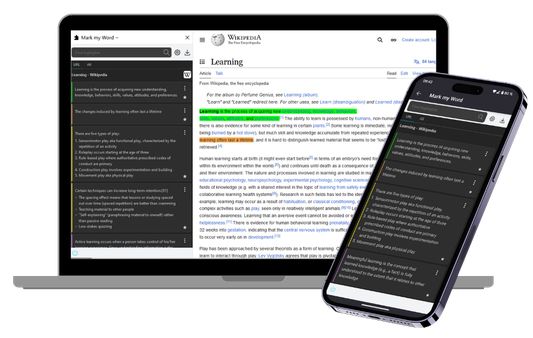
Highlighter to mark text on any website on desktop and mobile with the Mark my Word browser extension for Firefox. Export the highlights to your favorite note-taking tool and keep what is important to you.

Disponibil su Firefox par Android™Disponibil su Firefox par Android™
4.4 (14 recensions)4.4 (14 recensions)
441 utents441 utents
Discjame Firefox e instale la estension
Discjame il file

Metadâts de estension

Schermadis
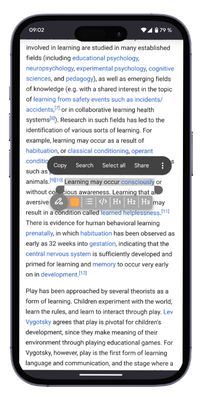
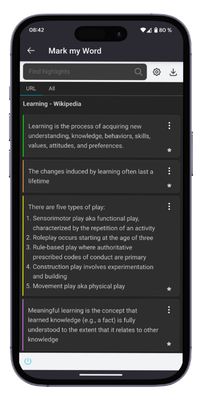
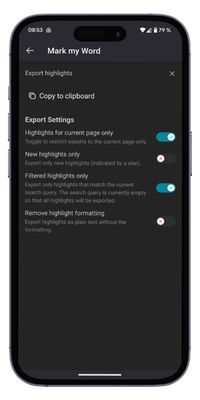
Create Highlight in Firefox and Firefox for Android .HighlightManageExport
Informazions su la estension
Your essential web highlighter and annotation tool for Firefox. Effortlessly capture key information, add notes, and organize your research. Copy & paste formatted highlights directly into your favorite note-taking apps like Notion, Obsidian, Evernote, and more.

Mark my Word turns the web into your personal, organized library. Stop losing track of important information and level-up your research and learning workflow.

✨Capture & Annotate with Ease
  • Highlight Anywhere: Seamlessly highlight text on any website, from articles to forums.
  • Add Context: Add comments to any highlight to capture your thoughts and insights instantly.
  • Advanced Formatting: Use special formatting for lists, titles, or code snippets to keep your highlights structured and readable.
  • Control Your View: Hide or show highlights on a page to focus on what matters.

🗂️ Organize Your Knowledge
  • Powerful Sidebar: Manage all your highlights in one convenient sidebar.
  • Search & Filter: Quickly find any highlight you've ever made.
  • Folder Organization: Group your highlights by project, topic, or the system of your choice.
  • Custom Experience: Adjust the highlighter's colors, formats and behavior to fit your needs.

🚀 Export to Your Favorite Tools
  • One-Click Copy: Copy all your highlights to the clipboard in clean, formatted Markdown.
  • Seamless Integration: Paste directly into Notion, Obsidian, Evernote, Roam Research, Logseq, or any other Markdown-based tool.
  • Smart Export: Choose to export only the new highlights you haven't saved yet, preventing duplicates.
Valutât 4,4 di 14 recensôrs
Jentre par dâ un vôt a cheste estension
No son ancjemò valutazions

Valutazion in stelis salvade

5
11
4
1
3
0
2
1
1
1
Lei dutis e 14 lis recensions
Permès e dâts

Permès obligatoris:

  • Meti dâts tes notis
  • Discjariâ files, lei e modificâ la cronologjie dai discjamâts dal navigadĂ´r
  • Acedi aes schedis dal navigadĂ´r
  • Acedi ai tiei dâts di ducj i sĂŽts web
Plui informazions
Altris informazions
Colegaments component adizionâl
  • Pagjine iniziâl
  • SĂŽt di supuart
  • E-mail pal supuart
Version
0.8.0
Dimension
351,63 kB
Ultin inzornament
prije 5 mjeseci (3. srp. 2025)
Categoriis coreladis
  • Feeds, notiziis e blogs
  • Struments di ricercje
  • Segnelibris
Licence
Ducj i dirits riservâts
Cronologjie versions
  • ViĂ´t dutis lis versions
Etichetis
  • dark mode
  • search
Zonte ae racuelte
Segnale chest component adizionâl
Va ae pagjine principâl dal sÎt Mozilla

Components adizionâi

  • Informazions
  • Blog dai components adizionâi di Firefox
  • Laboratori estensions
  • Centri di svilup
  • Politichis pal svilupadĂ´r
  • Blog de comunitât
  • Forum
  • Segnale un erĂ´r
  • Vuide pes recensions

NavigadĂ´rs

  • Desktop
  • Mobile
  • Enterprise

Prodots

  • Browsers
  • VPN
  • Relay
  • Monitor
  • Pocket
  • Bluesky (@firefox.com)
  • Instagram (Firefox)
  • YouTube (firefoxchannel)
  • Riservatece
  • Cookies
  • Notis legâls

Gjavât dulà che al ven indicât in mÝt diviers, i contignÝts su chest sÎt a son distribuÎts cun licenceCreative Commons Atribuzion CondivÎt te stesse maniere v3.0 o versions sucessivis. Android e je une marche regjistrade di Google LLC.