CleansingX: Twitter X Filter par A Muh Mufqi Zuhudi
Filter and hide unwanted content on X.com (formerly Twitter) to enhance your browsing experience.
15 utilisateurs·trices15 utilisateurs·trices
Métadonnées de l’extension
Captures d’écran

À propos de cette extension
CleansingX is an extension that helps filter and hide unwanted content on X.com (formerly Twitter) to enhance your browsing experience.
Key Features
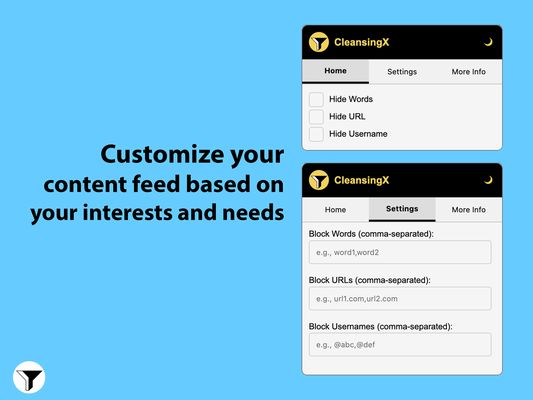
- Word Filtering: Hide posts containing specific words or phrases.
- URL Filtering: Block content from specific domains or URLs.
- Username Filtering: Hide posts from specific usernames.
- Wildcard Support: Use * for flexible pattern matching.
- Dark/Light Theme: Toggle between dark and light interface modes.
- Real-time Filtering: Updates content filtering as you scroll.
- Persistent Settings: Your filters and preferences are saved across sessions.
How to Use
- Click the CleansingX icon in your browser toolbar
- Navigate between:
a) Home: Quick enable/disable filters
b) Settings: Configure filter rules
c) Info: View extension information and support
Adding Filters
- Words: Enter comma-separated words or phrases to block
- URLs: Enter comma-separated domain names (e.g., example.com*)
- Usernames: Enter comma-separated usernames with @ prefix
Wildcard Pattern Examples
-
-
-
Support
For bugs, feature requests, or questions:
- Open an issue on GitHub
- Contact: mail@moefqy.com
Key Features
- Word Filtering: Hide posts containing specific words or phrases.
- URL Filtering: Block content from specific domains or URLs.
- Username Filtering: Hide posts from specific usernames.
- Wildcard Support: Use * for flexible pattern matching.
- Dark/Light Theme: Toggle between dark and light interface modes.
- Real-time Filtering: Updates content filtering as you scroll.
- Persistent Settings: Your filters and preferences are saved across sessions.
How to Use
- Click the CleansingX icon in your browser toolbar
- Navigate between:
a) Home: Quick enable/disable filters
b) Settings: Configure filter rules
c) Info: View extension information and support
Adding Filters
- Words: Enter comma-separated words or phrases to block
- URLs: Enter comma-separated domain names (e.g., example.com*)
- Usernames: Enter comma-separated usernames with @ prefix
Wildcard Pattern Examples
-
word* - Matches anything starting with "word"-
*word - Matches anything ending with "word"-
*word* - Matches anything containing "word"Support
For bugs, feature requests, or questions:
- Open an issue on GitHub
- Contact: mail@moefqy.com
Noté 5 par 1 personne
Autorisations et données
Autorisations nécessaires :
- Accéder aux onglets du navigateur
- Accéder à vos données pour les sites du domaine twitter.com
- Accéder à vos données pour les sites du domaine x.com
Plus d’informations
- Liens du module
- Version
- 1.0.1
- Taille
- 26,52 Ko
- Dernière mise à jour
- il y a un an (4 janv. 2025)
- Catégories associées
- Licence
- Licence MIT
- Historique des versions
- Étiquettes
- Ajouter à la collection
Le développeur de cette extension demande que vous l’aidiez à assurer la poursuite de son développement en lui versant une petite contribution.