Language Transliteration tekijä Senthil Ponnusamy
This add-on allows you to type in your own language. Tamil, Malayalam, Telugu, Kannada, Hindi, Bengali, Marathi, Gujarati, Urdu, Punjabi and more.
553 käyttäjää553 käyttäjää
Laajennuksen metatiedot
Kuvakaappaukset
Tietoja tästä laajennuksesta
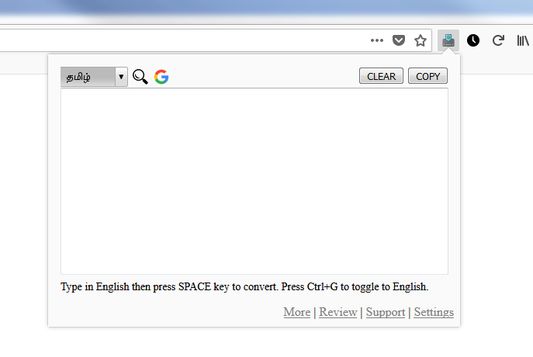
Use keyboard shortcut for the Language Transliteration Hot Key (Alt+L)
- Select your language in the dropdown.
- Start typing in English in the given textbox.
- Press SPACE Key to transliterate the typed word.
- If you want to type any English word use the shortcut key Ctrl+G.
- Using Ctrl+G again will toggle the transliteration again.
- Press the COPY button to copy the text into your clipboard.
- More languages will be added based on the requests.
- Select your language in the dropdown.
- Start typing in English in the given textbox.
- Press SPACE Key to transliterate the typed word.
- If you want to type any English word use the shortcut key Ctrl+G.
- Using Ctrl+G again will toggle the transliteration again.
- Press the COPY button to copy the text into your clipboard.
- More languages will be added based on the requests.
Arvio 4,4 21 arvostelijan toimesta
Lisätietoja
- Lisäosan linkit
- Versio
- 4.6resigned1
- Koko
- 83,34 kt
- Viimeksi päivitetty
- kaksi vuotta sitten (25. huhti 2024)
- Liittyvät luokat
- Lisenssi
- Kaikki oikeudet pidätetään
- Versiohistoria
- Lisää kokoelmaan
Tämän laajennuksen kehittäjä pyytää taloudellista tukeasi laajennuksen kehityksen jatkamiseksi.